Introduction
Table of contents
Today, we’ll be discussing regarding a minor (but crucial) security optimisation that was done.
Security vulnerabilities always seems unlikely until it happens. Therefore, when someone feedbacks that there is a security gap, NEVER dismiss it and find ways to remove the attack surface area!
WooCommerce (For the uninitiated)
WooCommerce is a powerful, open-source eCommerce plugin designed specifically for WordPress. It allows users to transform their WordPress websites into fully functional online stores with minimal effort. WooCommerce supports a wide range of features, including product management, inventory tracking, secure payment gateways, shipping options, and tax calculations.
WooCommerce Default Design: Checkout Flow Overview
The default WooCommerce checkout flow is designed to be simple and user-friendly. It typically includes the following steps:
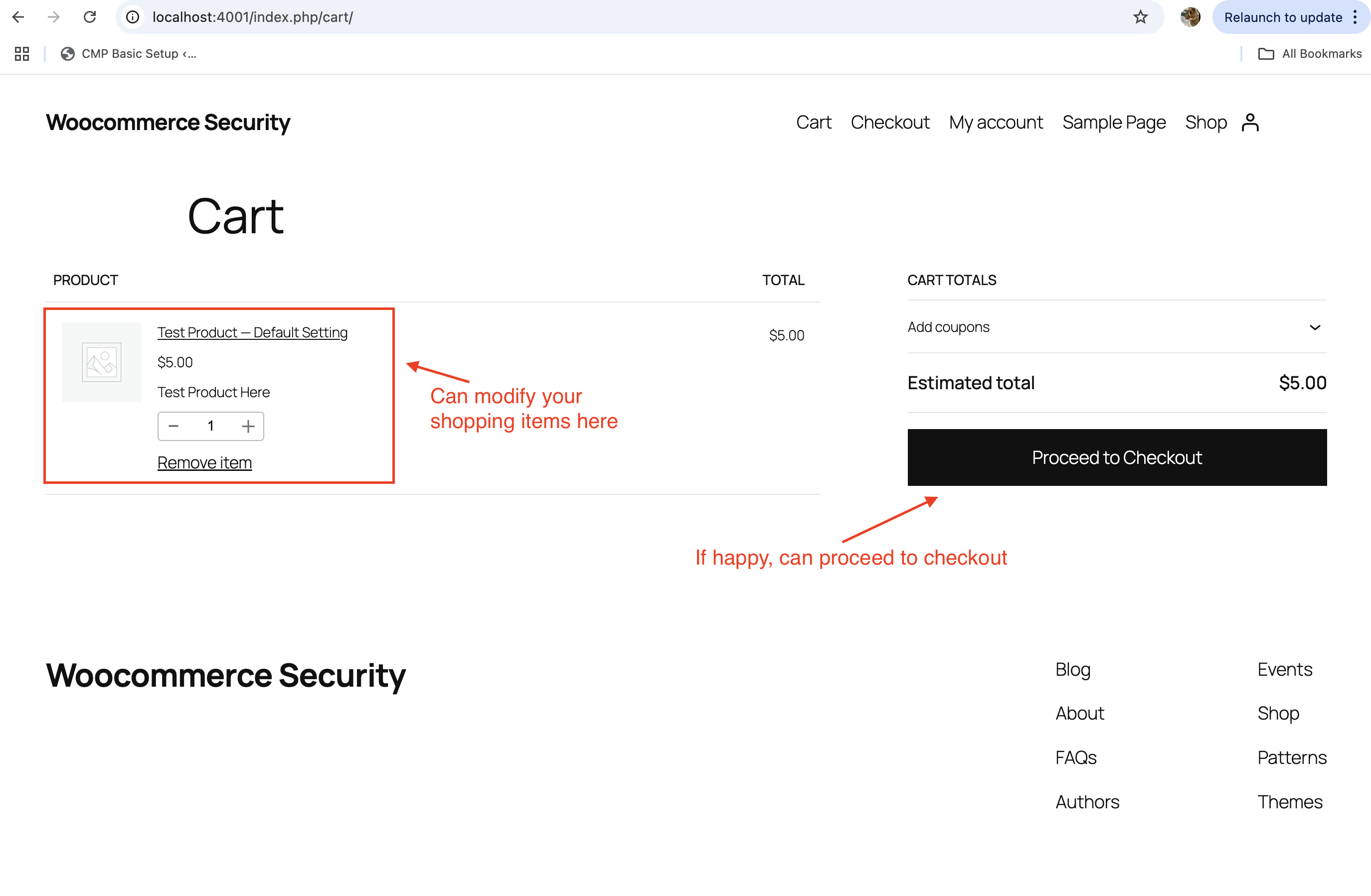
- Cart Page: Customers review the products they’ve added to their cart and can adjust quantities or remove items.
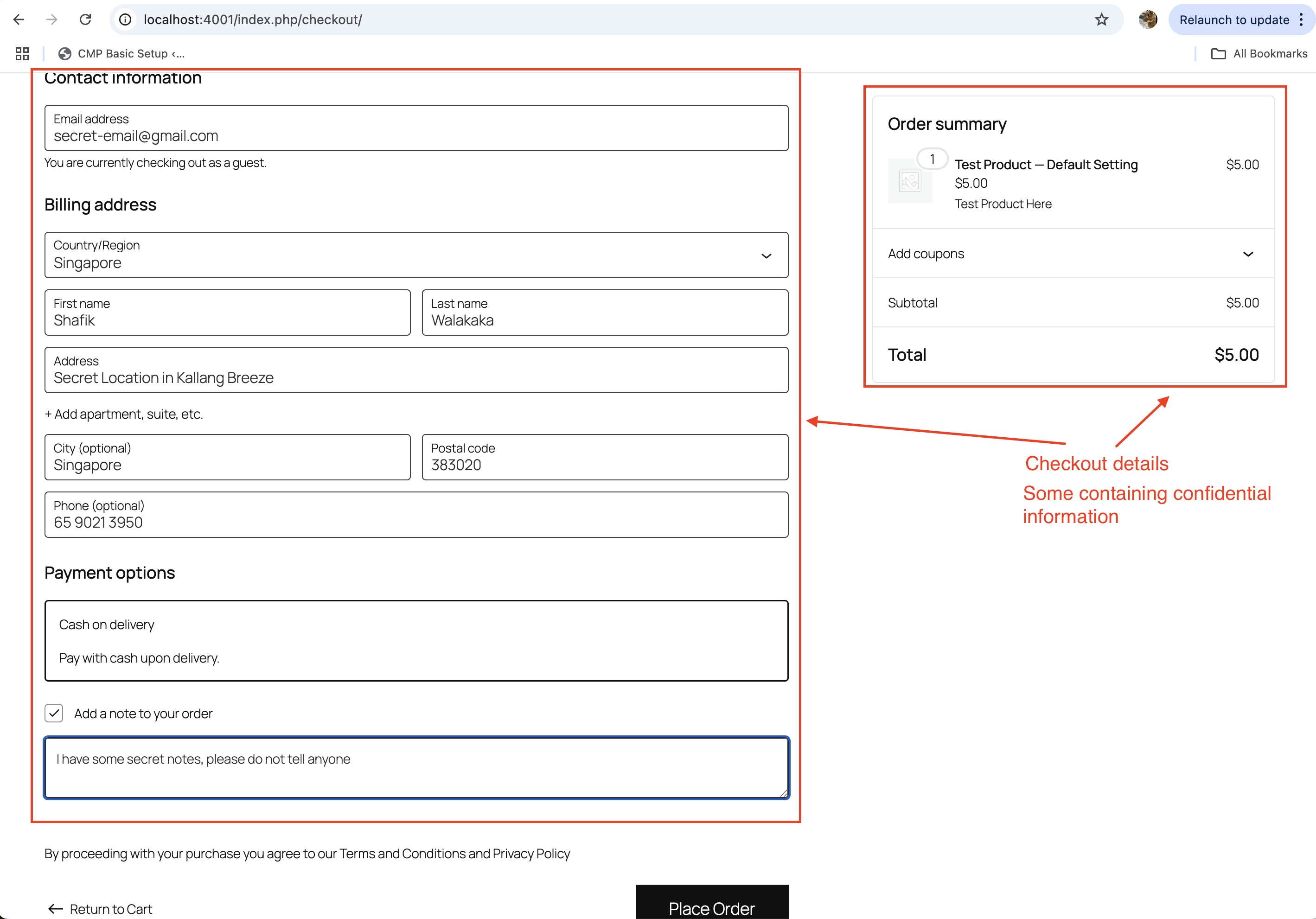
- Checkout Page: Customers enter their billing and shipping information, select a payment method, and confirm their order.
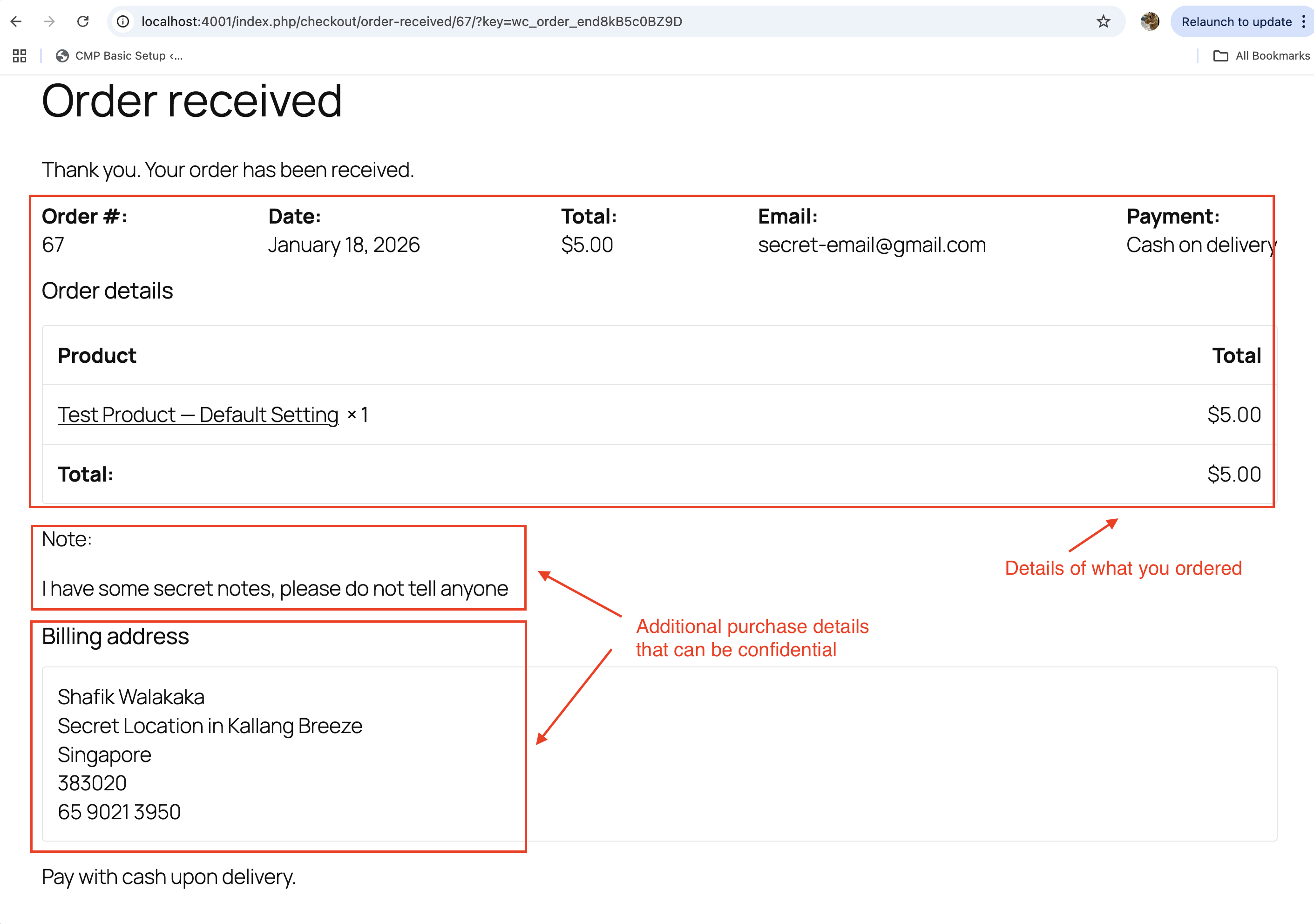
- Order Confirmation (Success Page): After completing the payment, customers are redirected to a success page that displays their order details and confirmation.
Security Lapse: Success Page Accessibility
By default, WooCommerce generates a unique Order Received (Success) page for each order. However, this page can be accessed by anyone who has the direct URL for a limited time (typically 5 minutes). This is because WooCommerce uses a query string in the URL (e.g., ?key=wc_order_xxxxx) to identify the order, and this key remains valid for a short period.
For reference of my transaction, you can see the URL http://localhost:4001/index.php/checkout/order-received/67/?key=wc_order_end8kB5c0BZ9D here: 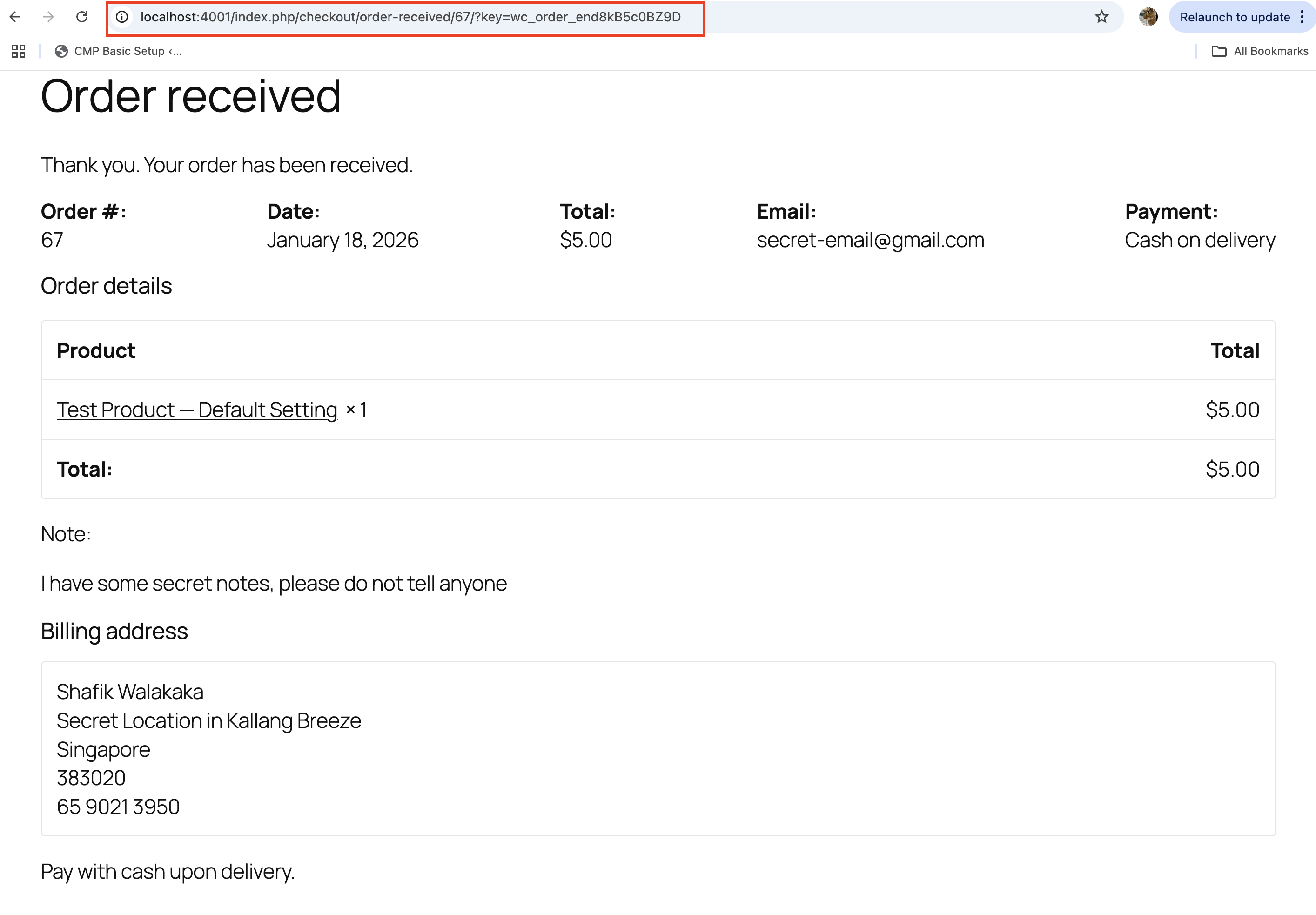
And if I copy this URL into a separate incognito browser, I am actually able to access all the billing information entered by the user (including home address etc.): 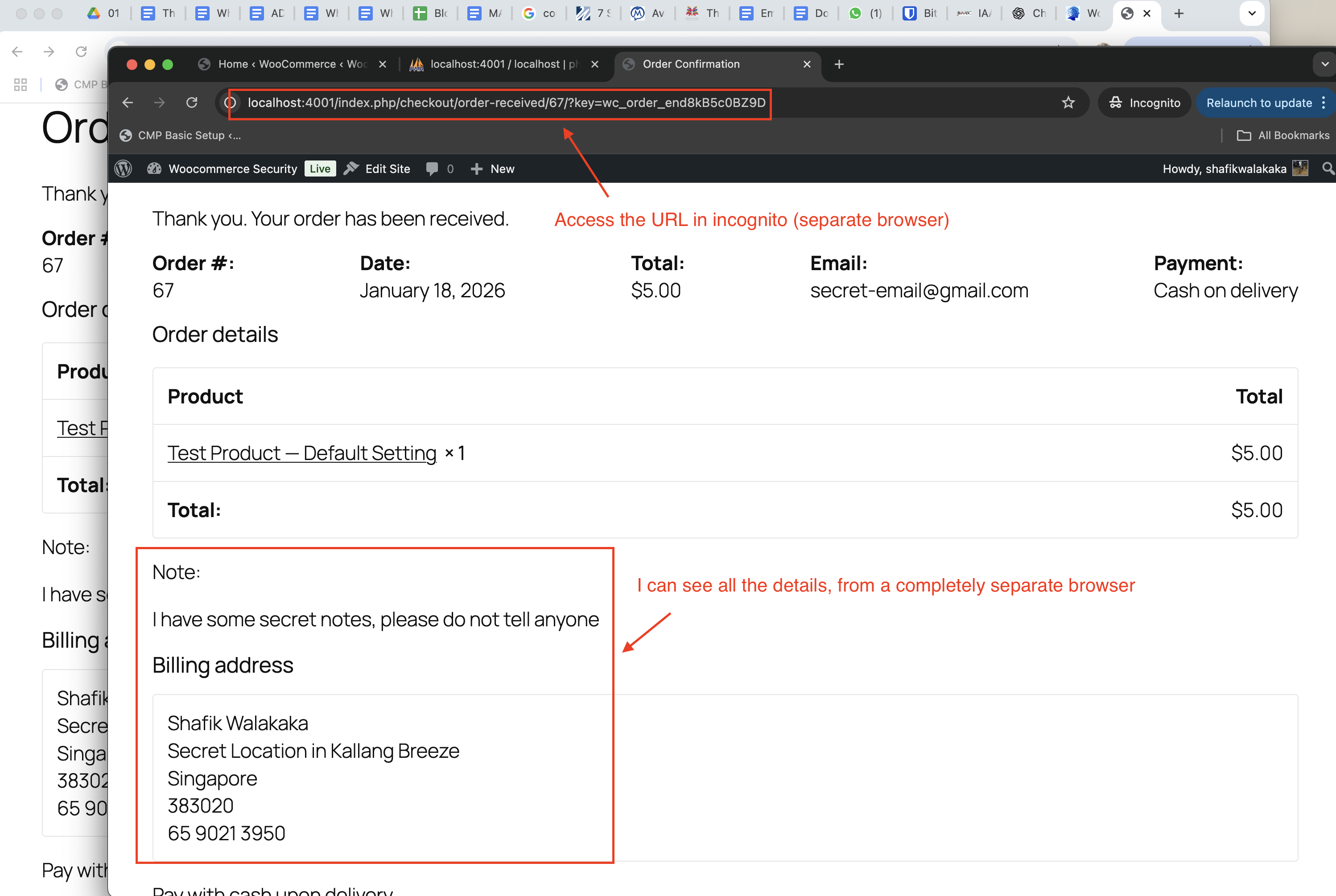
Why a Security Lapse
Potential Vulnerability
A malicious actor can exploit this by writing a script that systematically tries different combinations of order IDs (1234, 1235, etc.) and order keys (wc_order_xxxxx). If the order key is predictable or not properly secured, the attacker could gain access to sensitive order details, such as:
- Customer names
- Addresses
- Order items
- Payment details (if displayed)
Why This Happens
- Predictable Order IDs: WooCommerce uses sequential order IDs, making it easy for attackers to guess valid IDs.
- Temporary Order Key Validity: The
wc_order_keyin the URL is valid for a limited time (e.g., 5 minutes), but during this window, an attacker can brute-force the key. - Lack of Authentication: The success page does not require the user to be logged in, meaning anyone with the correct URL can access the page.
WooCommerce Mitigation
The “Order Received” (success) page in WooCommerce is publicly accessible for a limited time, typically 5 minutes. See screenshot of failing to access the details in the success page after 5 minuets:
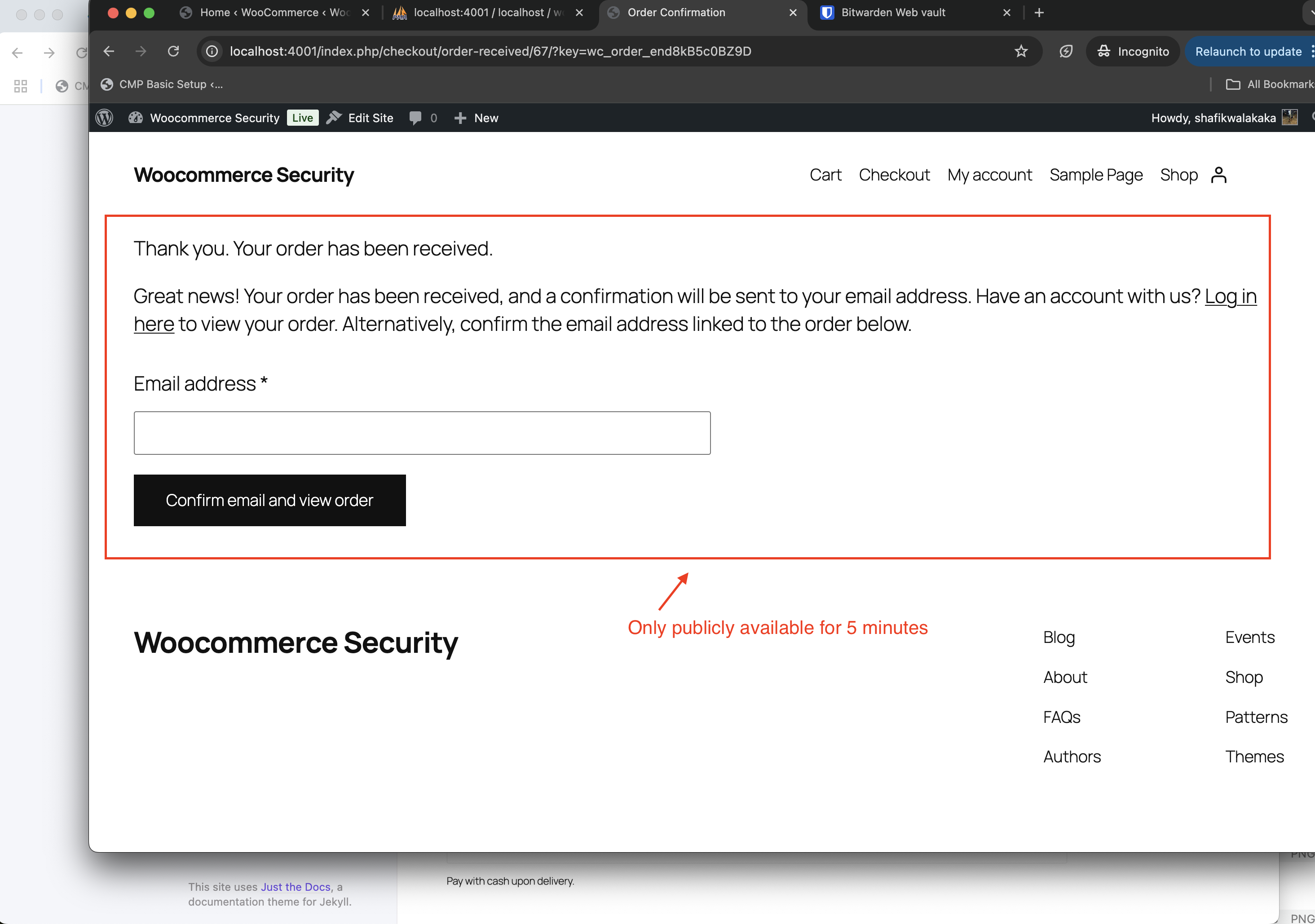
This temporary availability is intended to mitigate the risk of unauthorized access by keeping the attack window small.
During this time, a malicious actor would need to guess the exact order ID and order key to access the page.
Why This Mitigation is Insufficient
While the short time window reduces the likelihood of a successful attack, it is not a robust solution. With modern scripting capabilities, a malicious actor can automate the process of generating sequential order IDs and brute-forcing the order keys. This makes it relatively trivial to:
- Guess Order IDs: WooCommerce uses sequential order IDs, which are predictable and easy to iterate over.
- Automate Requests: Scripts can send thousands of requests within the 5-minute window, significantly increasing the chances of guessing a valid order key.
- Store Data: Any data retrieved from successful guesses can be stored and used for further exploitation, such as identity theft or fraud.
Our Opinion
From our perspective, this mitigation is insufficient. While it reduces the attack window, it does not eliminate the vulnerability. The reliance on a short time frame and the predictability of order IDs leave the system exposed to brute-force attacks. Stronger measures, such as requiring authentication or implementing additional validation mechanisms, are necessary to secure the “Order Received” page effectively.
First Attempt to Fix
Our first attempt to address the security issue with the publicly accessible “Order Received” page involved implementing a browser token validation system. The goal was to ensure that the page could only be accessed from the browser used to complete the purchase. Below is an overview of the approach we took:
Steps Taken:
Token Generation and Storage:
- A unique browser token was generated for each order using
wp_generate_password(). - This token was stored in the order metadata (
_required_browser_token) in the WooCommerce database. - A flag (
_browser_token_generated) was added to ensure the token was only generated once per order.
See screenshot of the browser token generated and stored in our database: 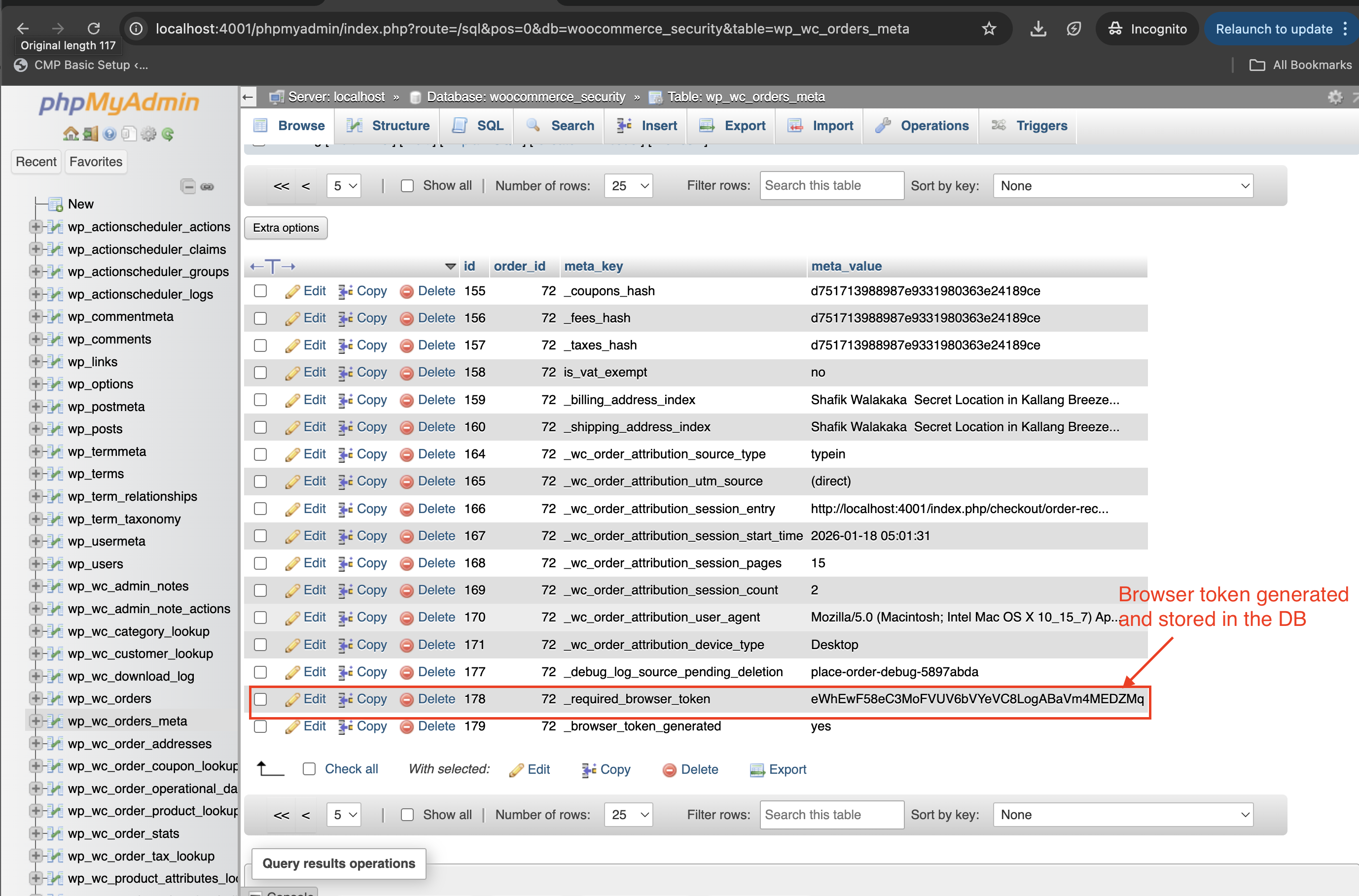
Injecting the Token into the Browser:
- The generated token was injected into the customer’s browser using JavaScript on the “Thank You” page.
- The token was stored in the browser’s
localStoragewith a unique key tied to the order ID.
See screenshot showing the same token for order ID 72 injected into local storage: 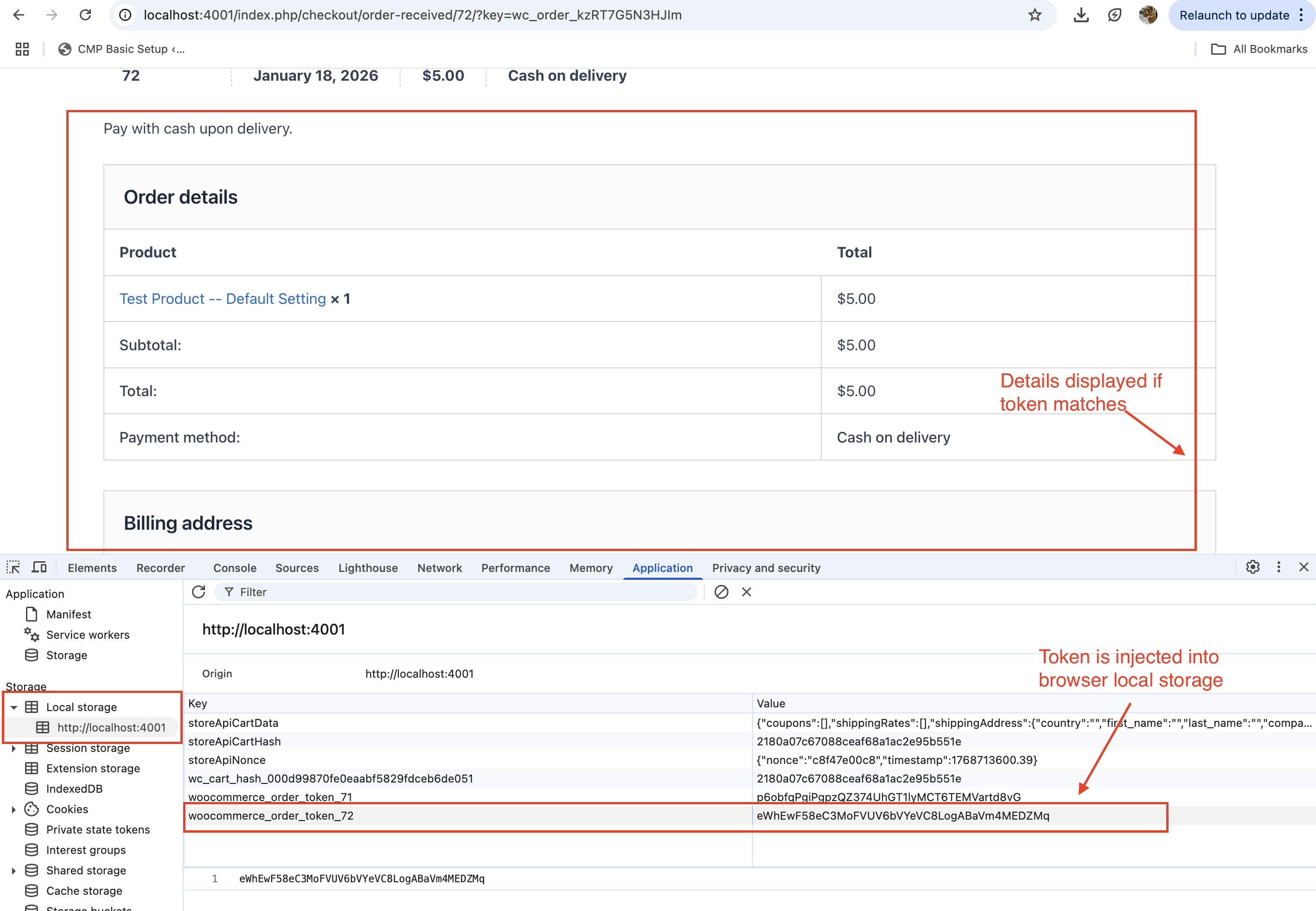
Validating the Token on the “Order Received” Page:
- When the “Order Received” page was accessed, the token stored in the browser’s
localStoragewas compared with the token stored in the WooCommerce database. - If the tokens matched, the page was displayed as normal.
- If the tokens did not match, the page content was visually blocked using JavaScript, and an “Access Denied” message was displayed.
Code Implementation:
The implementation involved two main hooks:
woocommerce_thankyou:
- This hook was used to generate the token and inject it into the browser’s
localStorage.
add_action( 'woocommerce_thankyou', function( $order_id ) {
    if ( ! $order_id ) return;

    $order = wc_get_order( $order_id );
    if ( ! $order || $order->get_meta( '_browser_token_generated' ) ) return;

    // Generate a unique browser token
    $browser_token = wp_generate_password( 40, false );
    $order->update_meta_data( '_required_browser_token', $browser_token );
    $order->update_meta_data( '_browser_token_generated', 'yes' );
    $order->save();

    // Inject JavaScript to store the token in the browser's localStorage
    ?>
    <script>
    // Store the unique browser token in localStorage
    localStorage.setItem('woocommerce_order_token_<?php echo $order_id; ?>', '<?php echo $browser_token; ?>');
    </script>
    <?php
}, 10 );
template_redirect:
- This hook was used to validate the token when the “Order Received” page was accessed.
- If the token validation failed, JavaScript was injected to block the page content visually.
add_action( 'template_redirect', function() {
    // Only target the "Order Received" page
    if ( isset( $_GET['key'] ) &&
         is_wc_endpoint_url( 'order-received' ) &&
         isset( $GLOBALS['wp']->query_vars['order-received'] ) &&
         ! empty( $GLOBALS['wp']->query_vars['order-received'] ) ) {

        global $wp;
        $order_id = absint( $wp->query_vars['order-received'] );
        $order_key = sanitize_text_field( $_GET['key'] );
        $order = wc_get_order( $order_id );

        if ( $order && $order->get_order_key() === $order_key ) {
            $required_token = $order->get_meta( '_required_browser_token' );

            // Inject JavaScript to validate the browser token
            add_action( 'wp_footer', function() use ( $order_id, $required_token ) {
                ?>
                <script>
                (function() {
                    const storedToken = localStorage.getItem('woocommerce_order_token_<?php echo $order_id; ?>');
                    const requiredToken = '<?php echo $required_token; ?>';

                    if ( !storedToken ) {
                        console.warn('Browser token is missing. Please ensure localStorage is enabled.');
                        return; // Allow access if the token is missing (optional).
                    }

                    if ( storedToken !== requiredToken ) {
                        // Block the page content visually
                        document.body.innerHTML = `
                            <div style="max-width: 600px; margin: 50px auto; padding: 40px; font-family: -apple-system, BlinkMacSystemFont, sans-serif; text-align: center; border: 2px solid #dc3545; border-radius: 10px; background: #f8d7da; color: #721c24;">
                                <h1 style="margin-bottom: 20px;">🔒 Access Denied</h1>
                                <p style="font-size: 18px; margin-bottom: 20px;">This order confirmation link cannot be accessed from this browser.</p>
                                <div style="background: #fff; padding: 20px; border-radius: 5px; margin: 20px 0; color: #495057;">
                                    <h3>This link only works from:</h3>
                                    <p>• The browser where you completed your purchase</p>
                                    <p>• The same device you used for payment</p>
                                    <br>
                                    <h3>Need to check your order?</h3>
                                    <p><a href="<?php echo wc_get_page_permalink( 'myaccount' ); ?>" style="color: #007cba; text-decoration: none; font-weight: bold;">→ View in your account</a></p>
                                    <p><a href="<?php echo wc_get_page_permalink( 'shop' ); ?>" style="color: #007cba; text-decoration: none;">← Continue shopping</a></p>
                                </div>
                                <p style="font-size: 14px; opacity: 0.8;">This security measure prevents unauthorized access to order details.</p>
                            </div>
                        `;
                    }
                })();
                </script>
                <?php
            }, 1 );
        }
    }
}, 1 );
Limitations of This Approach:
- Source Still Served:
- While the page content was visually blocked using JavaScript, the source of the page was still served to the browser. A determined attacker could inspect the page source and extract sensitive information.
Savvy hackers can still get access to the info, even though on the browser render - its hidden: 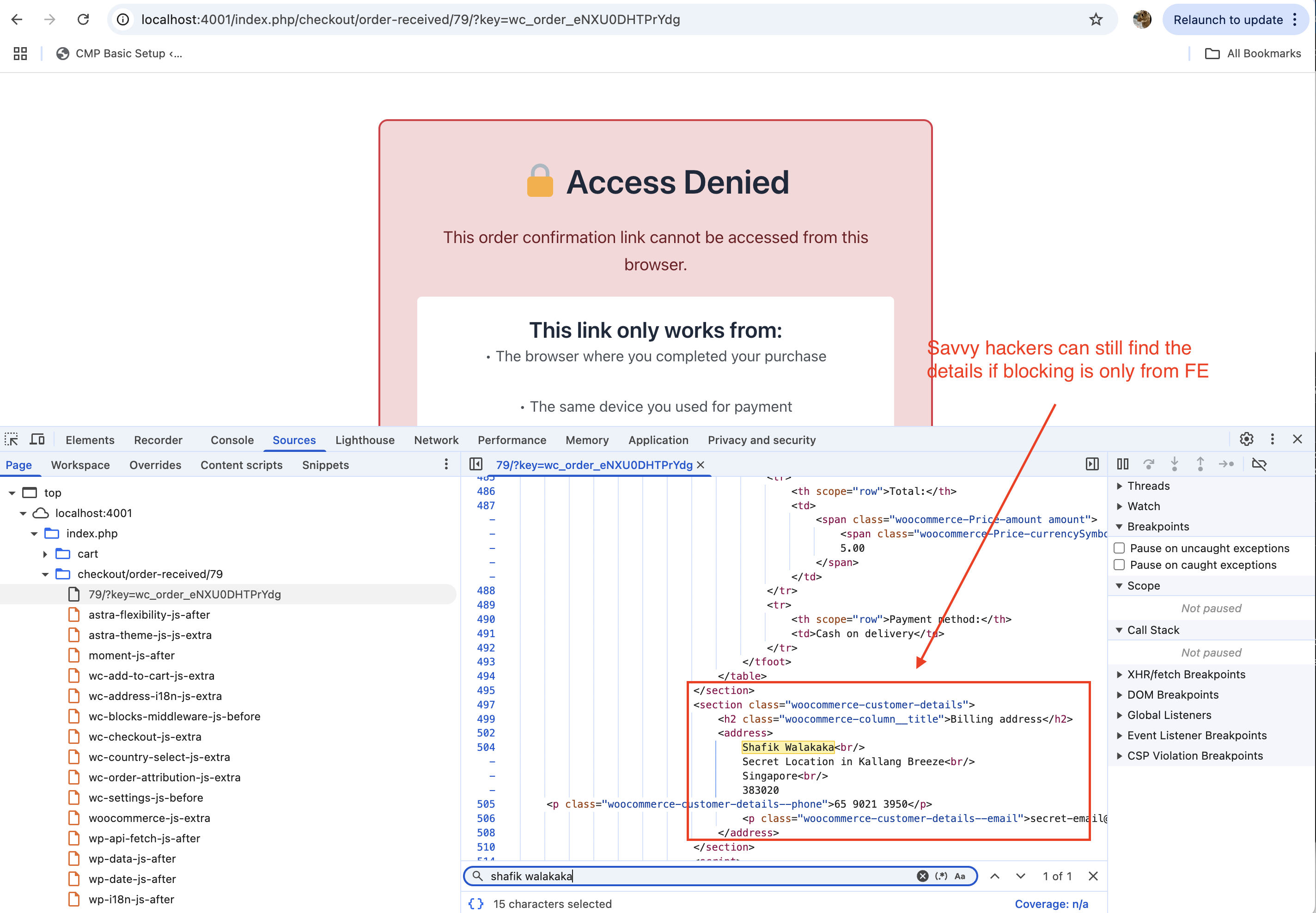
This first attempt provided a basic level of security by tying access to the “Order Received” page to the browser used during the purchase. However, it was not a complete solution, as the page source was still served. Further refinements were needed to address these limitations and enhance the overall security of the system.
Improvement: Server-Side Validation
To address the limitations of our first attempt, we implemented server-side validation to ensure that the “Order Received” page is never served unless the correct browser token is provided. This approach eliminates the possibility of savvy attackers accessing sensitive information, even if they inspect the page source.
Key Changes:
- Server-Side Validation:
- The browser token is now validated on the server before the page is served.
- If the token is missing or does not match the token stored in the WooCommerce database, the server blocks access to the page entirely.
Entirely being blocked means that the information is not being served at all. See where the network call returns access denied: 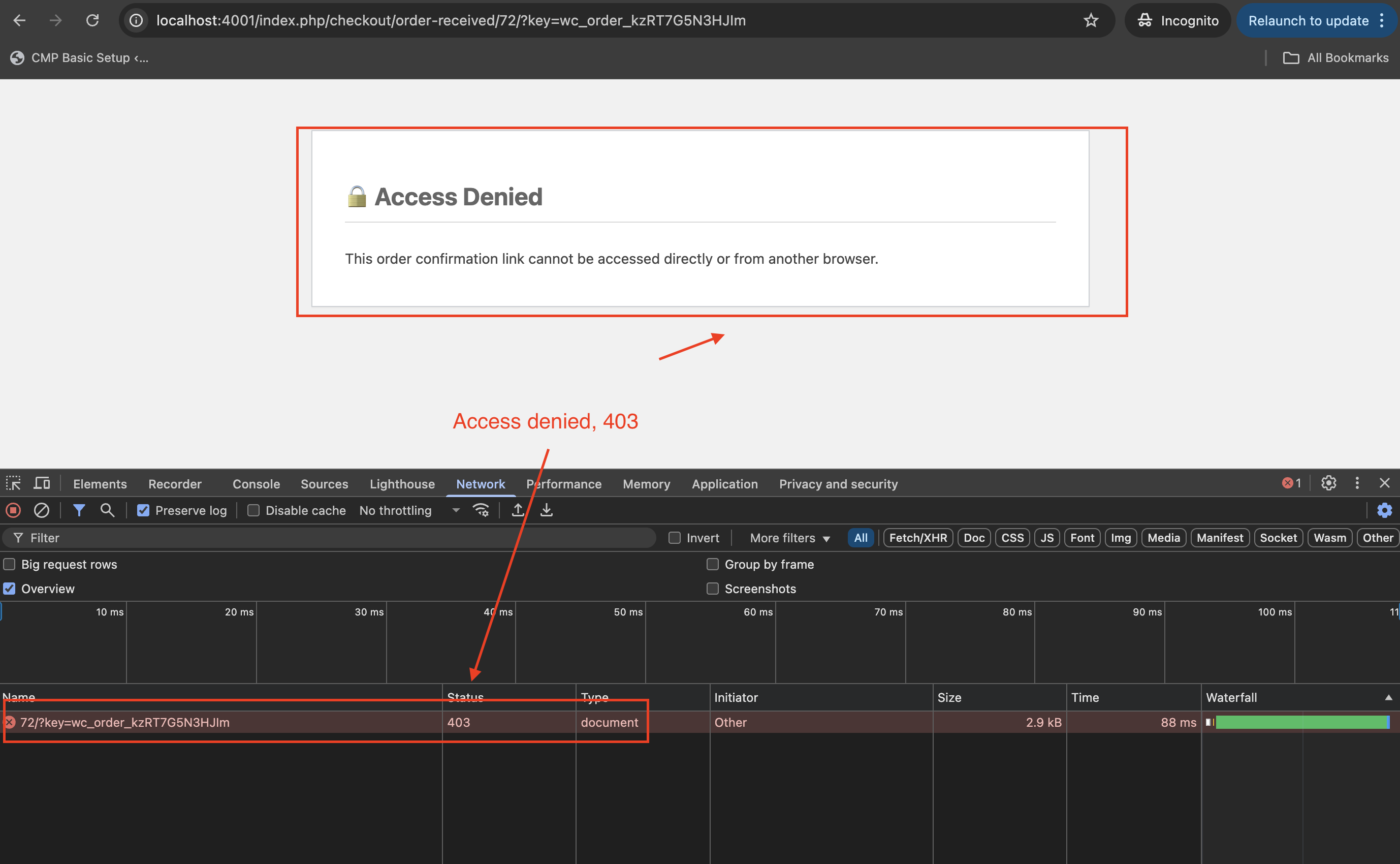
And since the source is not exposed at all, savvy attackers cannot find the sensitive details: 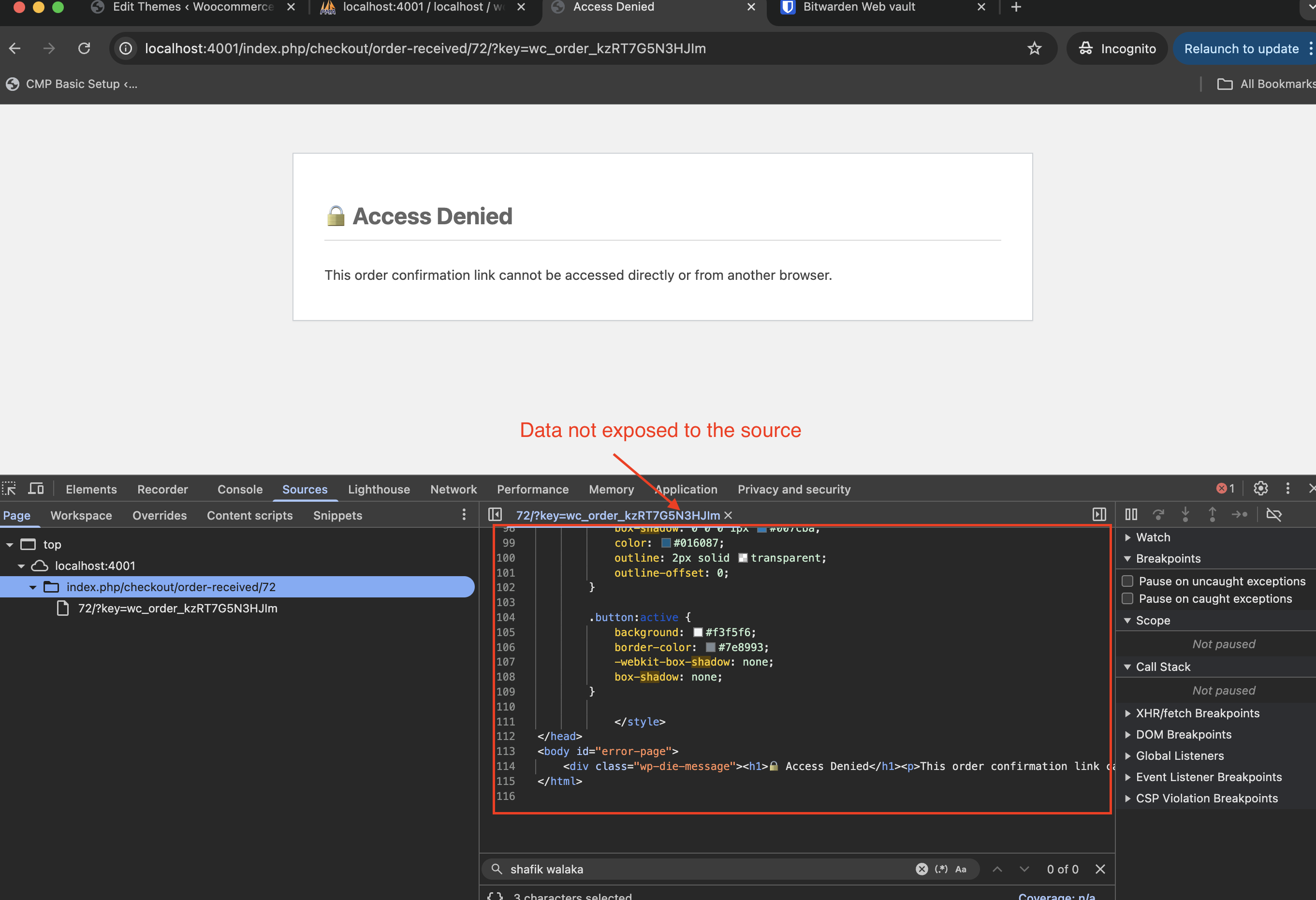
- Use of Cookies:
- Instead of relying on
localStorage, the browser token is stored in a cookie (woocommerce_order_token_<order_id>). - Cookies are sent with every request, allowing the server to validate the token without relying on JavaScript.
- Instead of relying on
For the server to validate, we need to send the token back to the server instead of validating it via JS in the browser. To do so, we send it back in a cookie: 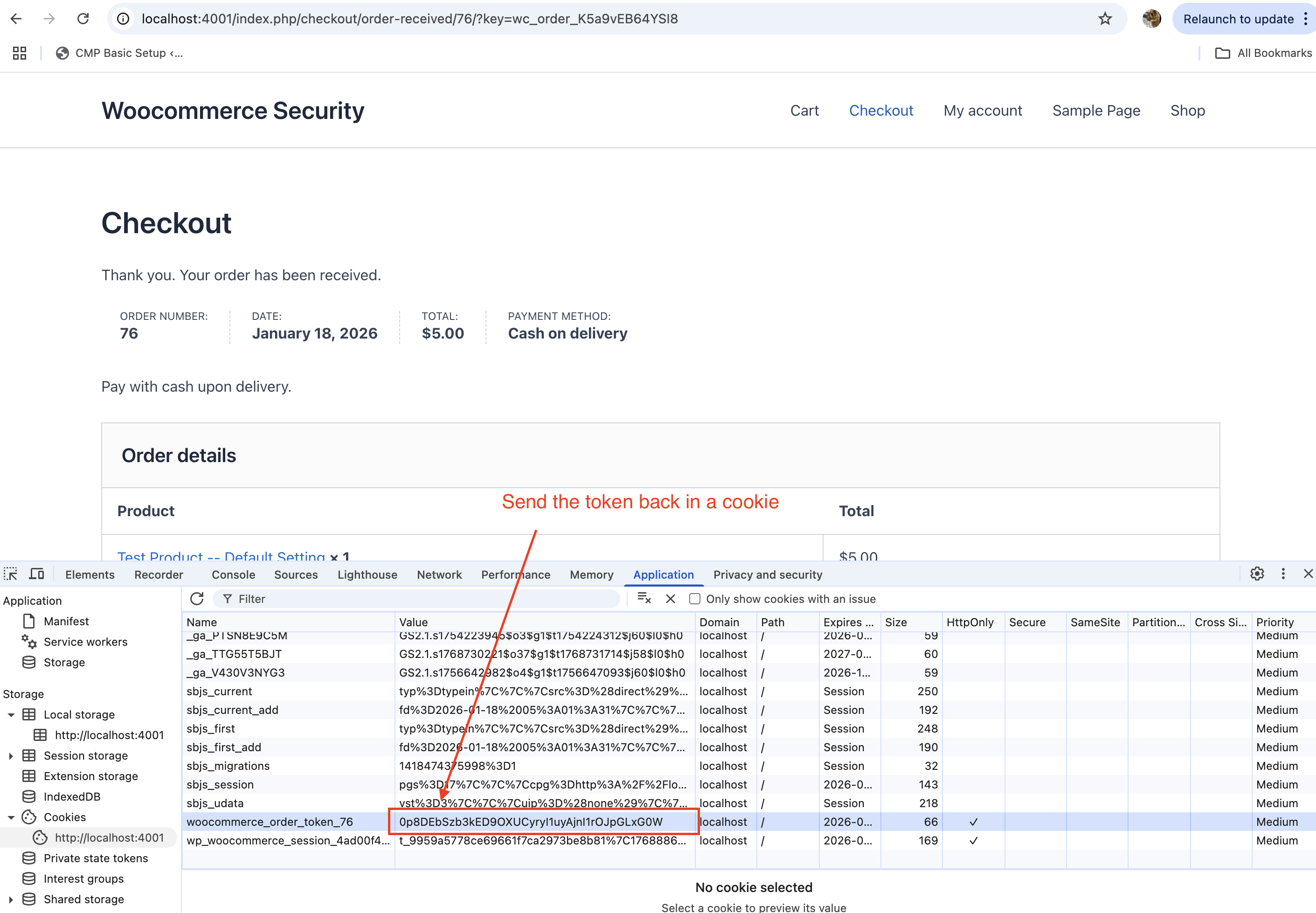
And in the server side, we check the token against our DB – if matches, then we serve the sucess page, else we block: 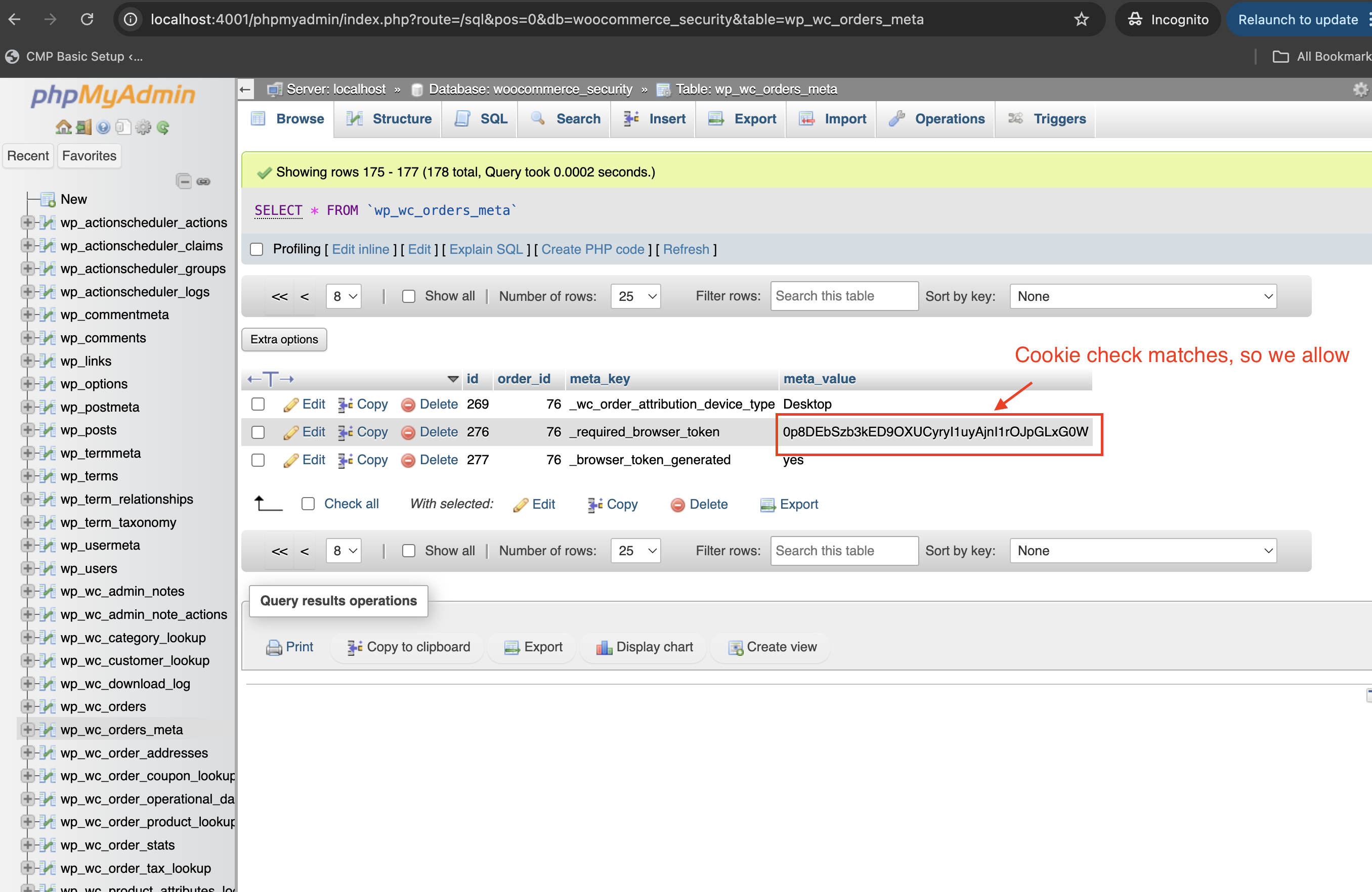
- Access Denied Response:
- If the token validation fails, the server immediately returns an HTTP 403 response with a custom “Access Denied” message.
- This ensures that the page content is never served, even in the source.
Code Implementation:
We made changes to the code to ensure that it sets a cookie that will be sent back to the server:
add_action( 'woocommerce_thankyou', function( $order_id ) {
    if ( ! $order_id ) return;

    $order = wc_get_order( $order_id );
    if ( ! $order || $order->get_meta( '_browser_token_generated' ) ) return;

    // Generate a unique browser token
    $browser_token = wp_generate_password( 40, false );
    $order->update_meta_data( '_required_browser_token', $browser_token );
    $order->update_meta_data( '_browser_token_generated', 'yes' );
    $order->save();

    // Set the token in a cookie
    setcookie( "woocommerce_order_token_$order_id", $browser_token, time() + 3600, COOKIEPATH, COOKIE_DOMAIN, is_ssl(), true );

    // Inject JavaScript to store the token in the browser's localStorage
    ?>
    <script>
    // Store the unique browser token in localStorage
    localStorage.setItem('woocommerce_order_token_<?php echo $order_id; ?>', '<?php echo $browser_token; ?>');
    </script>
    <?php
}, 10 );
The following code demonstrates the server-side validation:
add_action( 'template_redirect', function() {
    // Only target the "Order Received" page
    if ( isset( $_GET['key'] ) &&
         is_wc_endpoint_url( 'order-received' ) &&
         isset( $GLOBALS['wp']->query_vars['order-received'] ) &&
         ! empty( $GLOBALS['wp']->query_vars['order-received'] ) ) {

        global $wp;
        $order_id = absint( $wp->query_vars['order-received'] );
        $order_key = sanitize_text_field( $_GET['key'] );
        $order = wc_get_order( $order_id );

        if ( $order && $order->get_order_key() === $order_key ) {
            $required_token = $order->get_meta( '_required_browser_token' );

            // Check if the cookie is set
            if ( isset( $_COOKIE["woocommerce_order_token_$order_id"] ) ) {
                $stored_token = sanitize_text_field( $_COOKIE["woocommerce_order_token_$order_id"] );

                // Validate the token
                if ( $stored_token !== $required_token ) {
                    // Token mismatch, block access
                    wp_die(
                        '<h1>🔒 Access Denied</h1><p>This order confirmation link cannot be accessed from this browser.</p>',
                        'Access Denied',
                        array( 'response' => 403 )
                    );
                }
            } else {
                // No token found, block access
                wp_die(
                    '<h1>🔒 Access Denied</h1><p>This order confirmation link cannot be accessed directly or from another browser.</p>',
                    'Access Denied',
                    array( 'response' => 403 )
                );
            }
        }
    }
}, 1 );
Wrap Up
Wrap Up
A complete but nuanced approach to securing the “Order Received” page is essential to ensure customer data remains protected. While frontend measures like JavaScript validation can provide an additional layer of security, they are not sufficient on their own.
Key Takeaways:
- Backend-First Security: Security fixes should always be handled from the backend. This ensures that sensitive data is never exposed, even if attackers bypass frontend protections.
- Token-Based Validation: Using unique tokens tied to the browser and validating them server-side is an effective way to restrict access to sensitive pages.
- Eliminate Attack Surface: By ensuring the page is never served unless the token is valid, you eliminate the possibility of attackers extracting information from the source.
Securing WooCommerce requires a combination of thoughtful backend validation and robust practices to minimize vulnerabilities. Always prioritize backend solutions for bulletproof security.