Optimizing Elementor Background Video Performance
Table of contents
If your Elementor site has a background video in the hero section and you’re noticing that navigation, hamburger menus, and other scripts fail to load on first visit — requiring a page refresh to work — this guide walks through exactly how we diagnosed and fixed it.
The Symptoms
The site was exhibiting a specific failure pattern:
- Page loads but hamburger menu is unresponsive
- Navigation scripts appear broken on first visit
- Refreshing the page fixes everything immediately
- Problem is worse on slower connections or cold loads
- Site has a Vimeo or YouTube background video in the hero section
The refresh fixing it was the most important clue. It indicated the browser was getting overwhelmed during initial load, not that scripts were fundamentally broken.

Understanding the Problem
It Is Not an API Problem
The first instinct is to blame the external video platform — Vimeo or YouTube taking too long to respond. That is not the root cause.
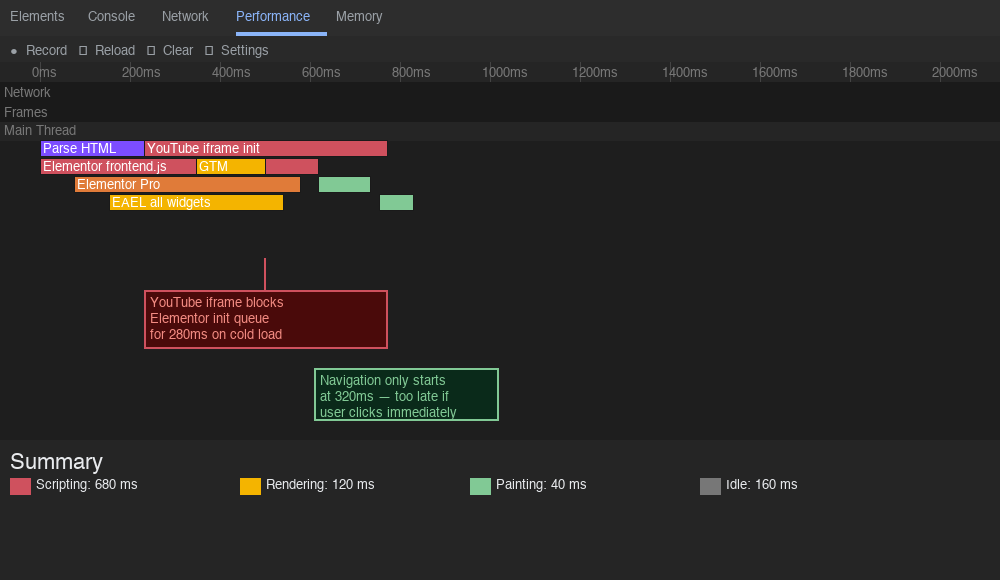
The real problem is JS execution budget. Browsers have a finite capacity to execute JavaScript at any given moment. On a script-heavy page, all scripts compete for that capacity simultaneously.
What Is Eating the JS Execution Budget
On a typical content-heavy Elementor site, the following all compete during the same initialization window:
Elementor frontend.js        ← large, unoptimized bundle
Elementor Pro frontend.js    ← additional weight
EAEL (Essential Addons)      ← loads ALL addon scripts
                                even for unused widgets
Multiple YouTube iframes     ← each brings its own scripts
Third party review widgets   ← external API calls
Google Tag Manager           ← loads even more scripts
How Elementor Initializes
Elementor’s frontend JS initializes all widgets sequentially from top to bottom of the page:
Elementor frontend.js loads
    ↓
Starts initializing widgets one by one
    ↓
Hits background video widget (top of page)
    ↓
Begins video player setup
    ↓
Everything else queued behind this
    ↓
Navigation, menus, accordions all waiting
    ↓
On slow connections = appears completely broken
The background video widget sits at the very top of the page, meaning it is first in Elementor’s initialization queue. On slow connections or busy servers, if video initialization takes too long, everything behind it in the queue never gets a chance to run before the user tries to interact with the page.
Why Refresh Fixes It
On first load, the browser fetches everything cold. On refresh, assets are cached, scripts execute faster, and the initialization queue clears before the user interacts. This is why the problem appears intermittent — it is a race condition between script execution time and user interaction.
The Fix — Force Video to Initialize Last
The solution is to intercept Elementor’s video initialization and deliberately push it to the back of the queue, letting all critical scripts — navigation, menus, accordions — initialize first.
How It Works
Page loads
    ↓
Elementor frontend.js executes
    ↓
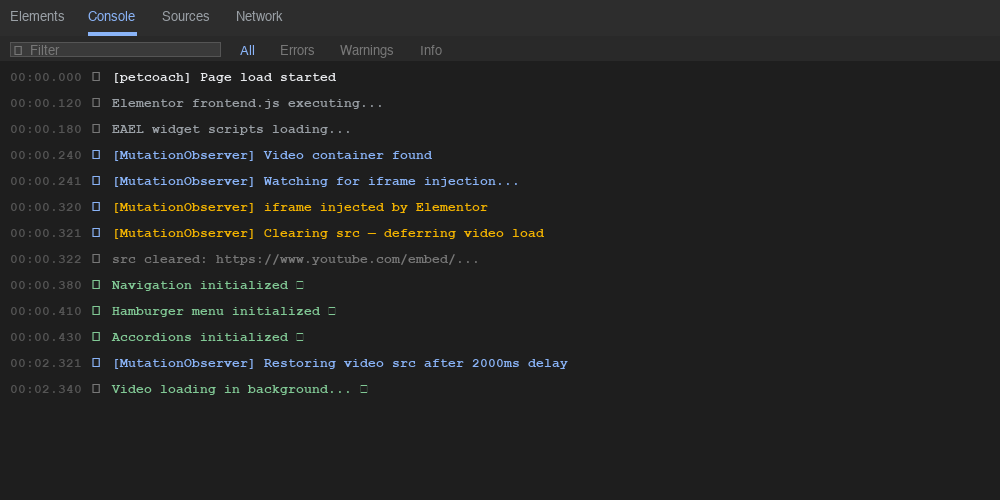
MutationObserver watches video container
    ↓
When Elementor injects the iframe,
observer immediately clears its src
    ↓
All other widgets initialize cleanly
Navigation works ✓
Hamburger menu works ✓
Accordions work ✓
    ↓
2 seconds after load event
    ↓
Video src restored
Video loads quietly in background ✓
Why MutationObserver Instead of a Simple Timer
Elementor dynamically injects the video iframe via its own JS — it is not hardcoded in the HTML. This means you cannot simply look for the iframe on DOMContentLoaded because it may not exist yet. A simple timer would be a guess. MutationObserver watches the container and reacts the moment Elementor injects the iframe, regardless of timing.
The Code
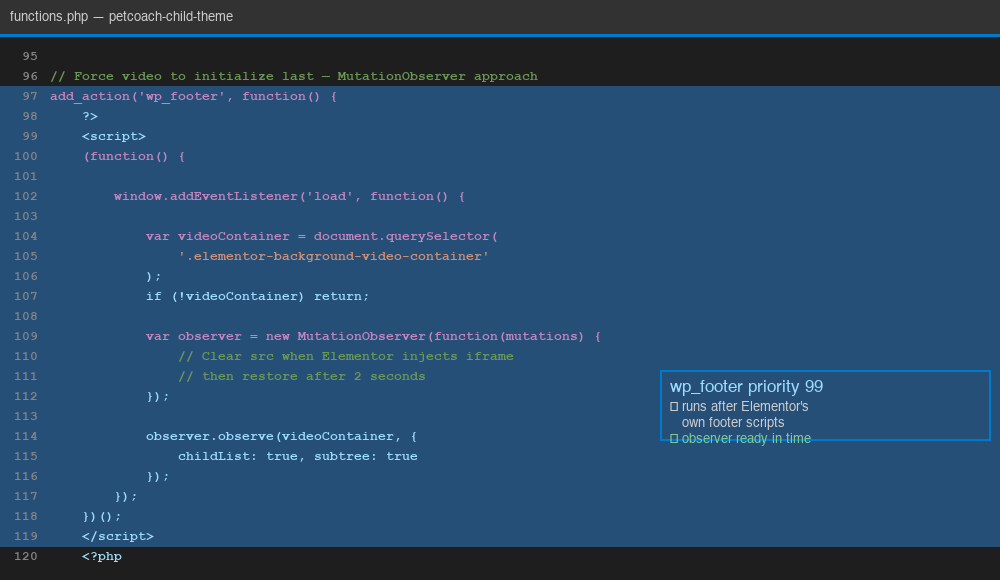
Add this to your child theme’s functions.php:
add_action('wp_footer', function() {
    ?>
    <style>
    /* Show fallback image while video is waiting */
    .elementor-background-video-container {
        background-image: url('your-fallback-image.jpg');
        background-size: cover;
        background-position: center;
    }

    /* Hide iframe until ready */
    .elementor-background-video-container iframe {
        opacity: 0;
        transition: opacity 0.5s ease;
    }

    /* Fade in smoothly when video is ready */
    .elementor-background-video-container iframe.ready {
        opacity: 1;
    }
    </style>

    <script>
    (function() {

        window.addEventListener('load', function() {

            var videoContainer = document.querySelector(
                '.elementor-background-video-container'
            );

            if (!videoContainer) return;

            // Watch for when Elementor injects the iframe
            var observer = new MutationObserver(
                function(mutations) {
                    mutations.forEach(function(mutation) {
                        mutation.addedNodes.forEach(
                            function(node) {

                            // Check if Elementor injected an iframe
                            if (node.nodeName === 'IFRAME') {

                                // Immediately clear src
                                // so it does not compete
                                // during page initialization
                                var src = node.src;
                                node.src = '';

                                // Disconnect observer, job done
                                observer.disconnect();

                                // Restore video after everything
                                // else has had time to initialize
                                setTimeout(function() {
                                    node.src = src;

                                    // Fade in smoothly once loaded
                                    node.addEventListener(
                                        'load',
                                        function() {
                                            node.classList.add('ready');
                                        }
                                    );
                                }, 2000);
                            }
                        });
                    });
                }
            );

            // Start watching the video container
            observer.observe(videoContainer, {
                childList: true,
                subtree: true
            });

        });

    })();
    </script>
    <?php
}, 99); // priority 99 = runs after all other footer scripts
The wp_footer priority of 99 ensures this script is output after Elementor’s own footer scripts, so the observer is registered and ready before Elementor begins its widget initialization pass.
The Unexpected Result
After implementing this fix, the page did not just stop breaking — it actually felt faster than before, even though the video now technically loads later.
This is not a contradiction. It is a well studied UX concept called perceived performance.
Actual vs Perceived Load Time
Actual load time:    same or slightly longer
Perceived load time: significantly faster
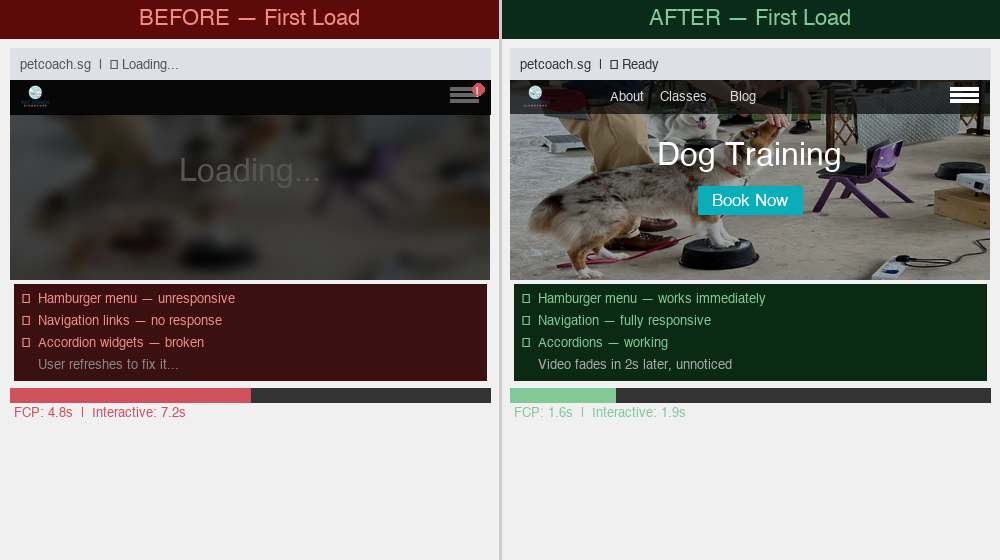
Before the fix, the browser was overwhelmed trying to initialize everything simultaneously. The user would land on the page and find navigation broken, menus unresponsive, accordions not working. Nothing felt ready even though scripts were technically still loading.
After the fix, the user lands on the page and immediately finds navigation working, menus responsive, content interactive. The brain registers the page as loaded. The video fades in quietly in the background two seconds later and the user barely notices.
The Traffic Jam Analogy
Before:
One slow vehicle (video iframe)
blocking an entire motorway
all traffic queued behind it
nothing moving

After:
Slow vehicle pulls over
all traffic flows freely
vehicle rejoins road when clear
The video was not just slow itself — it was acting as a blocker for everything behind it in Elementor’s initialization queue. Removing it from the critical path freed the entire sequence.
Other Optimizations Worth Knowing
These did not directly solve the core problem but are worth understanding for a complete picture.
EAEL Selective Loading
Essential Addons for Elementor loads scripts for all its widgets sitewide by default, even on pages that only use one or two of them. Enabling selective loading is a significant JS reduction:
Essential Addons → Settings
→ Enable Widget Selective Loading
→ Only loads scripts for widgets
  actually used on that specific page
DNS Prefetch for Third Party Domains
Add to your theme’s <head> for a free 200-300ms saving per domain:
<link rel="dns-prefetch" href="//www.youtube.com">
<link rel="dns-prefetch" href="//i.ytimg.com">
<link rel="dns-prefetch" href="//player.vimeo.com">
<link rel="preconnect" href="https://www.youtube.com">
Lazy Load Accordion Iframes on Open
If your page has multiple YouTube iframes inside an accordion, only inject them when the accordion panel is actually opened:
document.querySelectorAll('.eael-accordion-header')
    .forEach(function(header) {
        header.addEventListener('click', function() {

            var content = this.nextElementSibling;
            var placeholder = content.querySelector(
                '[data-iframe-src]'
            );

            if (placeholder) {
                var iframe = document.createElement('iframe');
                iframe.src = placeholder.dataset.iframeSrc;
                placeholder.replaceWith(iframe);
            }
        });
    });
This means iframes only load when the user explicitly requests them, eliminating a significant portion of JS execution load on page init.
Fallback Image as GIF
For the period between page load and video initialization, a static fallback image is shown. If you want the hero to feel alive during this window, a GIF works as the fallback — Elementor’s fallback image field accepts GIFs like any other image.
Keep the GIF under 1MB. A heavy GIF can be slower than the video itself. The better alternative is a short looping MP4 used as a self hosted video, which streams far more efficiently than a GIF at equivalent quality.
Why Not Just Self Host the Video
Self hosting the MP4 on your own server or a CDN like Bunny.net eliminates the external dependency entirely and is the architecturally cleanest solution:
Self hosted video:
No third party server handshake
No player script to load
Starts buffering immediately
Elementor initializes it instantly
Nothing blocked
The tradeoff is workflow — someone needs to manage the video file, hosting costs, and CDN configuration. For most sites the MutationObserver fix above gives you most of the benefit with none of the infrastructure overhead.
What Does Not Work
A few approaches that seem logical but do not fully solve this:
LiteSpeed / WP Rocket JS exclusions alone — Excluding Elementor scripts from delay ensures they load without interference from other plugins, but does not fix the fact that Elementor’s own initialization chain processes the video widget before navigation widgets. The root cause is inside Elementor’s JS, which you cannot defer without breaking everything.
loading="lazy" on the iframe — Browsers implement this inconsistently. For above-the-fold elements the browser often ignores it entirely since the element is already in the viewport.
Simple setTimeout without MutationObserver — Guessing at timing is unreliable. Elementor’s iframe injection time varies based on server speed and script load order. MutationObserver reacts to the actual event rather than hoping a timer fires at the right moment.
Key Takeaways
- The background video is first in Elementor’s initialization queue and blocks everything behind it on slow loads
- The root cause is JS execution budget, not external API speed
- Forcing the video to load last via
wp_footerpriority 99 and MutationObserver unblocks the entire initialization chain - Pages feel faster even when a resource loads later, because perceived performance depends on critical interactive elements being ready, not total load time
- The refresh fixing the problem is a sign of a race condition, not broken code
- EAEL selective loading, DNS prefetch, and accordion lazy loading are worthwhile secondary optimizations
Until next time, peace and love!