Building a /publish Skill That Watches Its Own Deploy
Table of contents
- The problem: “pushed” isn’t the same as “published”
- What a Claude Code skill actually is here
- Finding the right thing to poll
- The polling step itself
- Sequence: what actually happens end to end
- What happens on failure
- Watching it run for real
- Why not simpler alternatives
- Files in this workflow
- Conclusion
In an earlier post I covered how I got Claude Code to generate this blog’s articles correctly – right folder, right nav_order, right frontmatter. That post stopped at “the article is written.” It didn’t cover what happens next: getting it from my local disk onto the actual live site, and knowing for sure that it landed.
That second half turned out to have its own small rabbit hole, which is what this post covers – a Claude Code custom slash command (/publish) that commits and pushes an article, and then keeps watching GitHub in the background until it can tell me, definitively, “it’s live” or “it broke.”
The problem: “pushed” isn’t the same as “published”
For a while, my actual workflow after finishing an article was: git add, git commit, git push, then just… wait, and eventually refresh the blog in a browser tab. That works, but it has two real gaps:
- No confirmation loop. A push can succeed while the deploy behind it still fails – a broken Liquid tag, a missing image path, whatever. Nothing about
git pushtells you that. - Manual babysitting. Even when it works, someone has to remember to go check, and to know roughly how long to wait before checking.
The fix was to make this a proper Claude Code skill – a markdown file under .claude/commands/ that Claude Code treats as a slash command – and to have that skill’s last step be “prove the deploy actually worked,” not just “assume it did because the push succeeded.”
What a Claude Code skill actually is here
Nothing exotic: .claude/commands/publish.md is a plain markdown file with numbered steps written in plain English (with embedded shell snippets). When I type /publish, Claude Code reads that file and follows it – checking branches, staging specific paths, writing a commit message, and so on – exactly like handing a checklist to a very literal colleague. The same pattern produced /preview (runs the local Jekyll dev server) and /branch (creates a feature branch before starting new article work) elsewhere in this repo.
The full file lives at .claude/commands/publish.md. Here’s the current step list:
Step 1 — Verify branch          (must be on main)
Step 2 — Show pending changes   (git status / git diff --stat)
Step 3 — Stage the article      (git add <specific-path>, never -A)
Step 4 — Commit                 (descriptive "publish: <title>" message)
Step 5 — Push to origin/main    (triggers the GitHub Pages deploy)
Step 6 — Confirm the push       (commit hash, live URL, start Step 7)
Step 7 — Poll GitHub Actions    (background loop, reports success or failure)
Steps 1-6 are the “obvious” part. Step 7 is the part that took actual investigation.
Finding the right thing to poll
My first instinct for Step 7 was GitHub’s legacy Pages-builds endpoint:
curl -s "https://api.github.com/repos/walakaka77/test-doc-site/pages/builds/latest"
That returned a flat 404. Rather than assume the endpoint was wrong in general, I checked what was actually deploying this repo, and found the answer sitting in the Actions tab: a GitHub Actions workflow named “Deploy Jekyll site to Pages”. This repo doesn’t use the classic branch-based Pages build at all – it deploys via Actions, which means the correct thing to poll is the workflow runs API, not the Pages-builds API:
curl -s "https://api.github.com/repos/walakaka77/test-doc-site/actions/runs?per_page=10"
This is a good example of a case where the fix wasn’t “try harder with the same tool” – it was recognizing the first endpoint was checking the wrong thing entirely for how this specific repo is configured. Two repos can both use “GitHub Pages” and be deployed by completely different mechanisms under the hood.
The polling step itself
Step 7, verbatim from .claude/commands/publish.md, run as a background Bash command so it doesn’t block anything else:
SHA=$(git rev-parse HEAD)
REPO="walakaka77/test-doc-site"
while true; do
  RESULT=$(curl -s "https://api.github.com/repos/$REPO/actions/runs?per_page=10" | python3 -c "
import json, sys
d = json.load(sys.stdin)
for r in d.get('workflow_runs', []):
    if r['head_sha'] == '$SHA':
        print(f\"{r['status']}|{r['conclusion']}|{r['html_url']}\")
        break
")
  if [ -n "$RESULT" ]; then
    STATUS=$(echo "$RESULT" | cut -d'|' -f1)
    if [ "$STATUS" = "completed" ]; then
      echo "$RESULT"
      break
    fi
  fi
  sleep 120
done
The loop is deliberately quiet: it prints nothing while the deploy is still in_progress or queued, and emits exactly one line – status|conclusion|html_url – the moment the run for this specific commit SHA reaches completed. That one line is what turns into the final report: which run, whether it was a success or a failure, and the URL to go look at directly.
Matching on head_sha specifically (not just “the latest run”) matters here. If two pushes land close together, “the latest run” could easily be someone else’s commit – or, in a solo repo, an earlier push that’s still finishing. Filtering by the exact SHA I just pushed is what makes the result trustworthy.
Sequence: what actually happens end to end
sequenceDiagram
    participant Me as Me
    participant Claude as Claude Code
    participant Git as Local git
    participant GH as GitHub (origin)
    participant Actions as GitHub Actions
    participant Pages as GitHub Pages

    Me->>Claude: /publish
    Claude->>Git: git branch --show-current
    Claude->>Git: git status / git diff --stat
    Claude->>Me: "These files will be committed -- confirm?"
    Me->>Claude: looks good
    Claude->>Git: git add <article-folder>
    Claude->>Git: git commit -m "publish: <title>"
    Claude->>GH: git push origin main
    GH-->>Claude: push accepted
    Claude->>Me: "Pushed. Commit <sha>. Checking deploy in the background..."

    GH->>Actions: triggers "Deploy Jekyll site to Pages"
    activate Actions
    par Claude polls in background
        loop every 2 minutes
            Claude->>GH: GET /actions/runs?per_page=10
            GH-->>Claude: workflow_runs[]
            Note over Claude: filter by head_sha,<br/>check status
        end
    and Actions builds and deploys
        Actions->>Pages: deploy build output
        Pages-->>Actions: deploy complete
    end
    Actions-->>Claude: status: completed, conclusion: success
    deactivate Actions
    Claude->>Me: "Deploy succeeded -- live at <url>. Run: <run-url>"
The two branches in that par block are the important part: Claude Code isn’t sitting there refreshing a page, and I’m not either. The push happens, GitHub Actions starts its own build independently, and the polling loop – running as a detached background task – checks in on it every two minutes until there’s a real answer, then surfaces it as a single notification.
What happens on failure
The same Step 7 covers the unhappy path, not just the happy one. If conclusion comes back as anything other than success, the skill doesn’t just say “it failed” – it pulls the specific job logs so I don’t have to open GitHub myself:
curl -s "https://api.github.com/repos/walakaka77/test-doc-site/actions/runs/<run_id>/jobs" \
  | python3 -m json.tool
That response includes each job’s steps and, for the failed one, enough context to point at which step broke (Jekyll build error, missing dependency, whatever it turns out to be) rather than a generic “something went wrong.”
There’s also a third outcome worth handling explicitly: the loop times out (15 minutes, generous against a normal ~1-2 minute deploy) without ever seeing completed. That’s treated as its own distinct report – “I couldn’t confirm either way” – rather than silently defaulting to “probably fine.” Silence is not the same as success.
Watching it run for real
Everything below isn’t staged – it’s screenshots from the actual Claude Code session that published this article, using the exact skill this post describes. There’s something fitting about a post on self-verifying deploys being the thing that proved itself out.
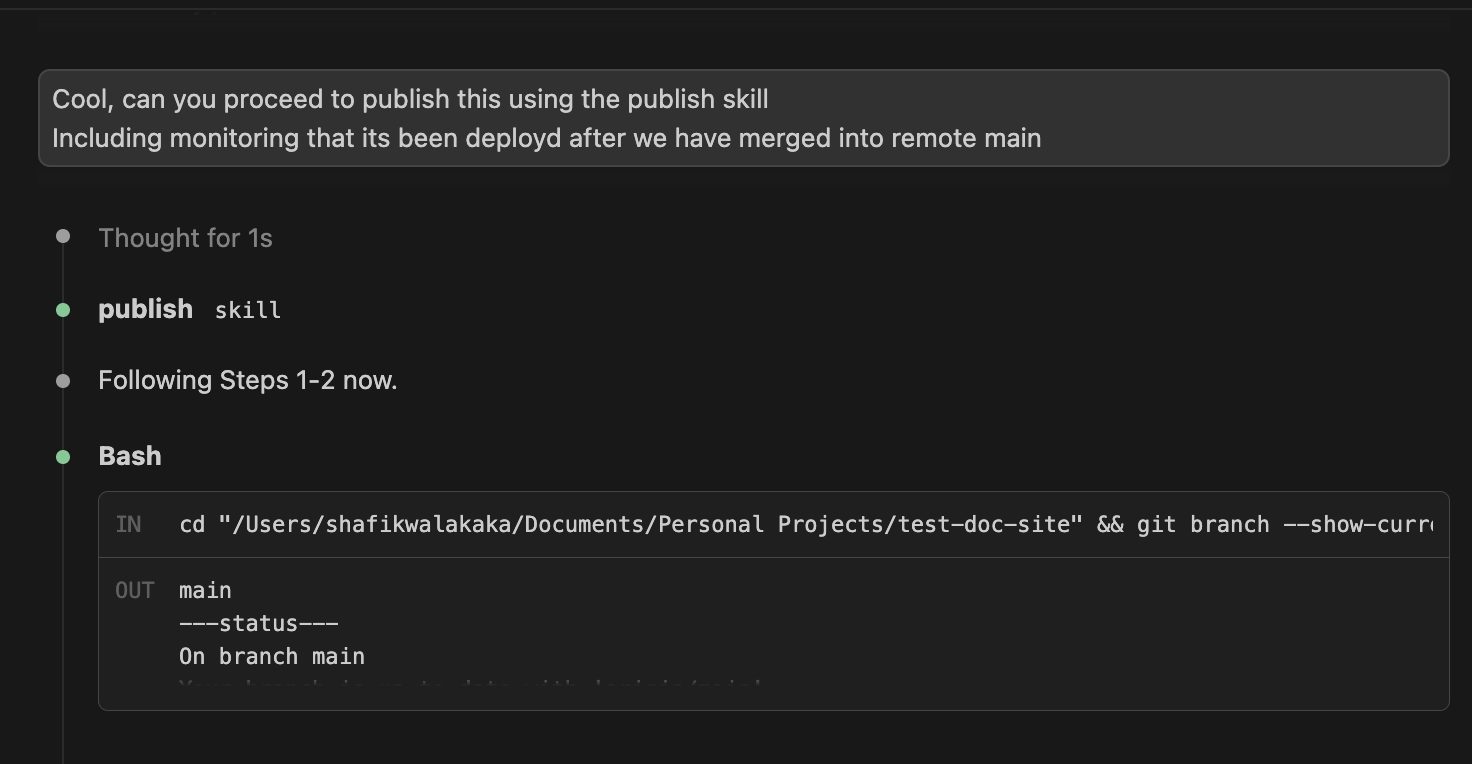
Steps 1-2: confirm the branch, show what’s pending
/publish starts by checking it’s actually on main, then runs git status so nothing gets committed blind:
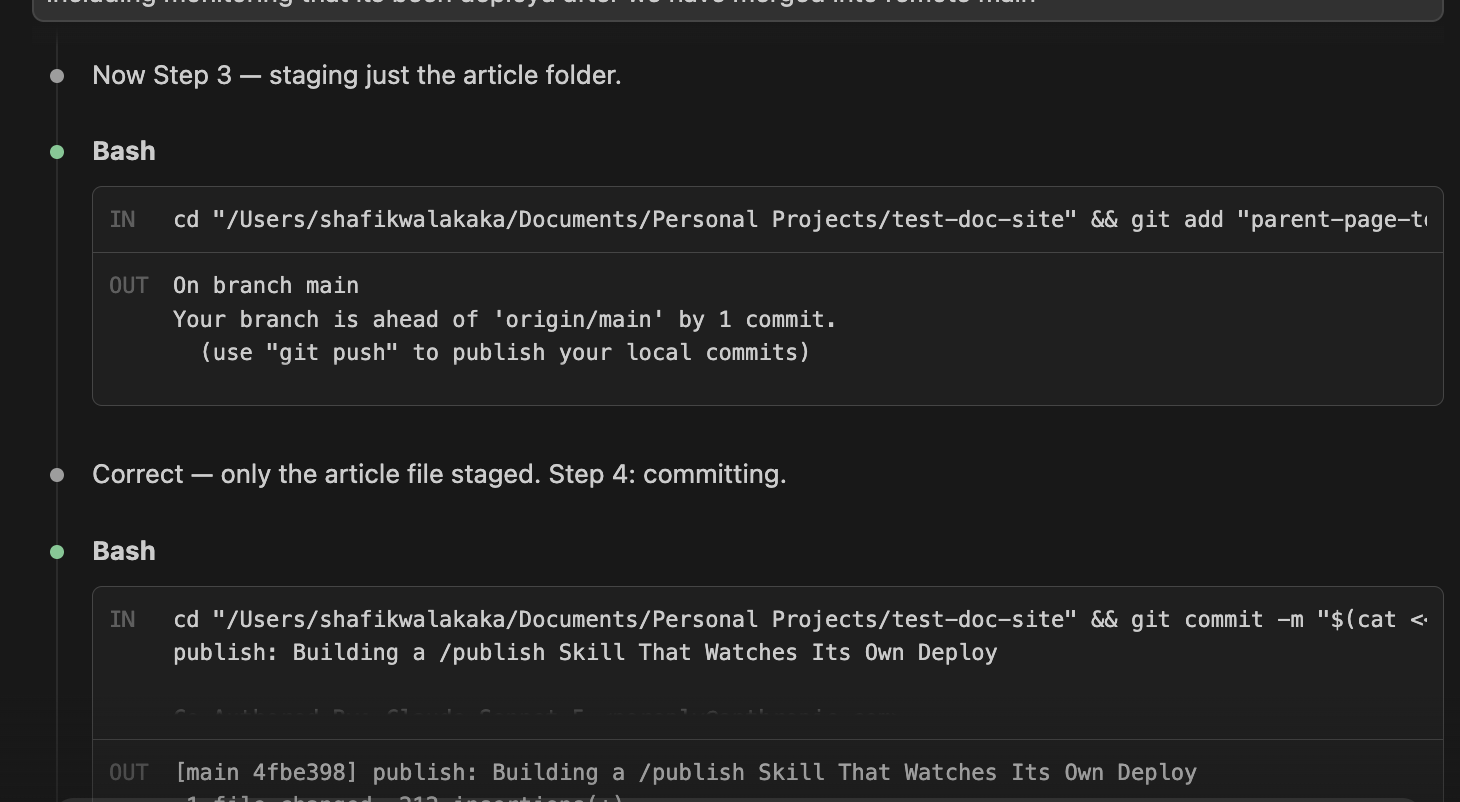
Steps 3-4: stage only the article, then commit
Only the specific article folder gets git add-ed – never -A, never . – and the commit message is built from the article’s own frontmatter title: field:
Step 5: push, and confirm the exact commit that shipped
git push origin main
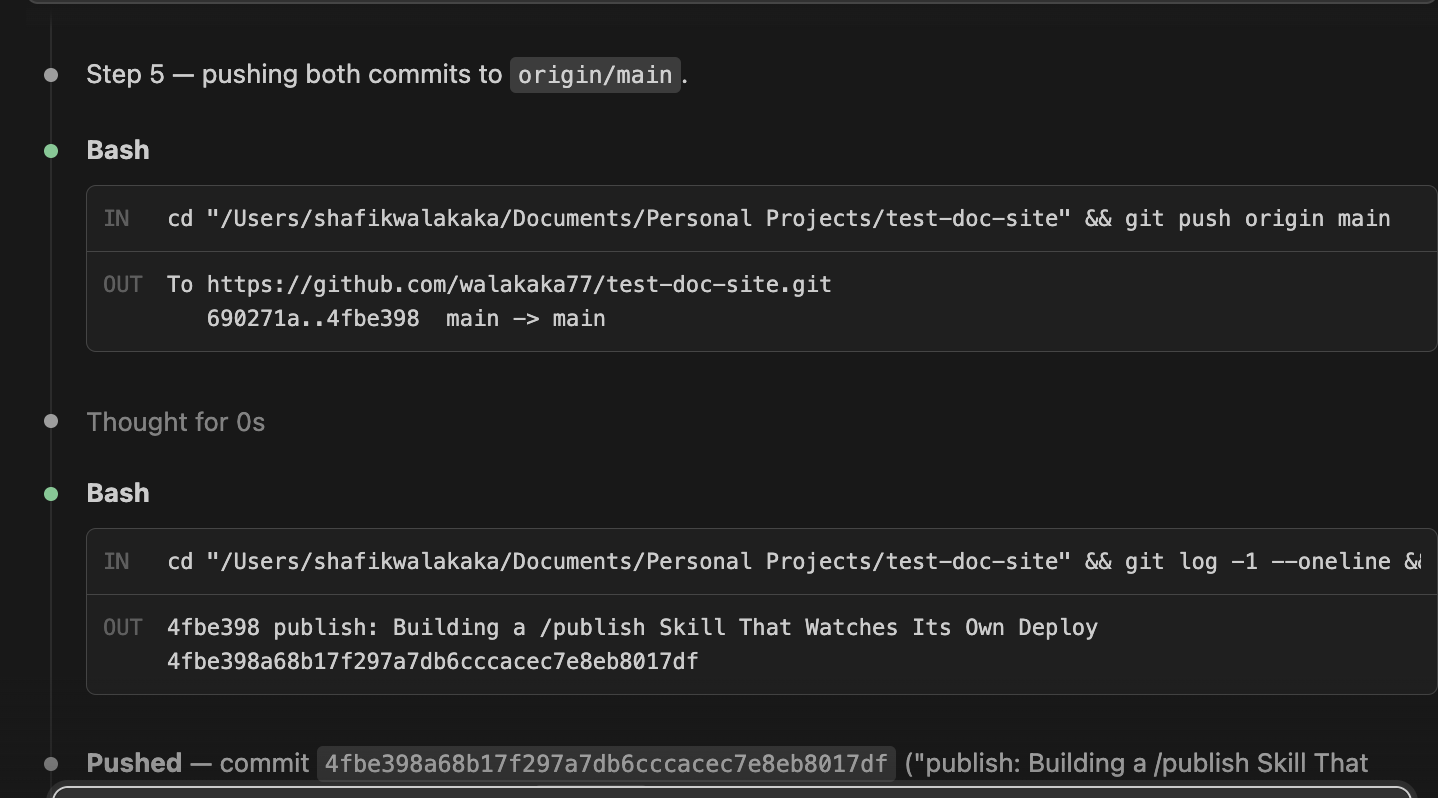
At this point git push has already succeeded – which, as covered above, is exactly the point where the old workflow used to just stop and hope.
Step 7: kick off the background poll
Instead of stopping there, the skill immediately launches the polling loop as a background task and hands control straight back:
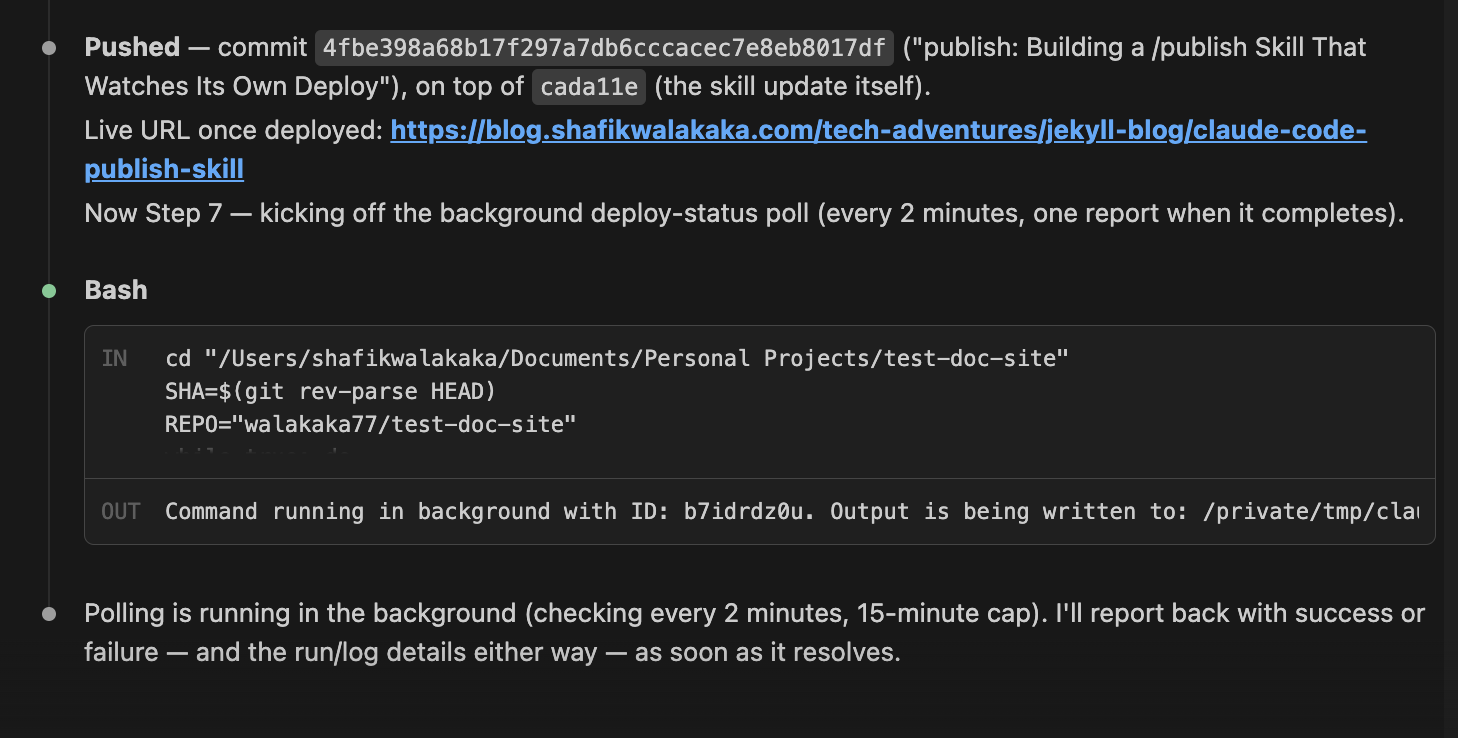
Note the phrasing here: “I’ll report back… as soon as it resolves.” Nothing is blocked waiting on this – I get the notification whenever GitHub actually finishes, not on some guessed timer.
Step 7: the poll resolves
Two minutes later (well within the 15-minute cap), the loop found the run for this exact commit SHA sitting at completed, and reported both the raw API result and a human-readable summary:
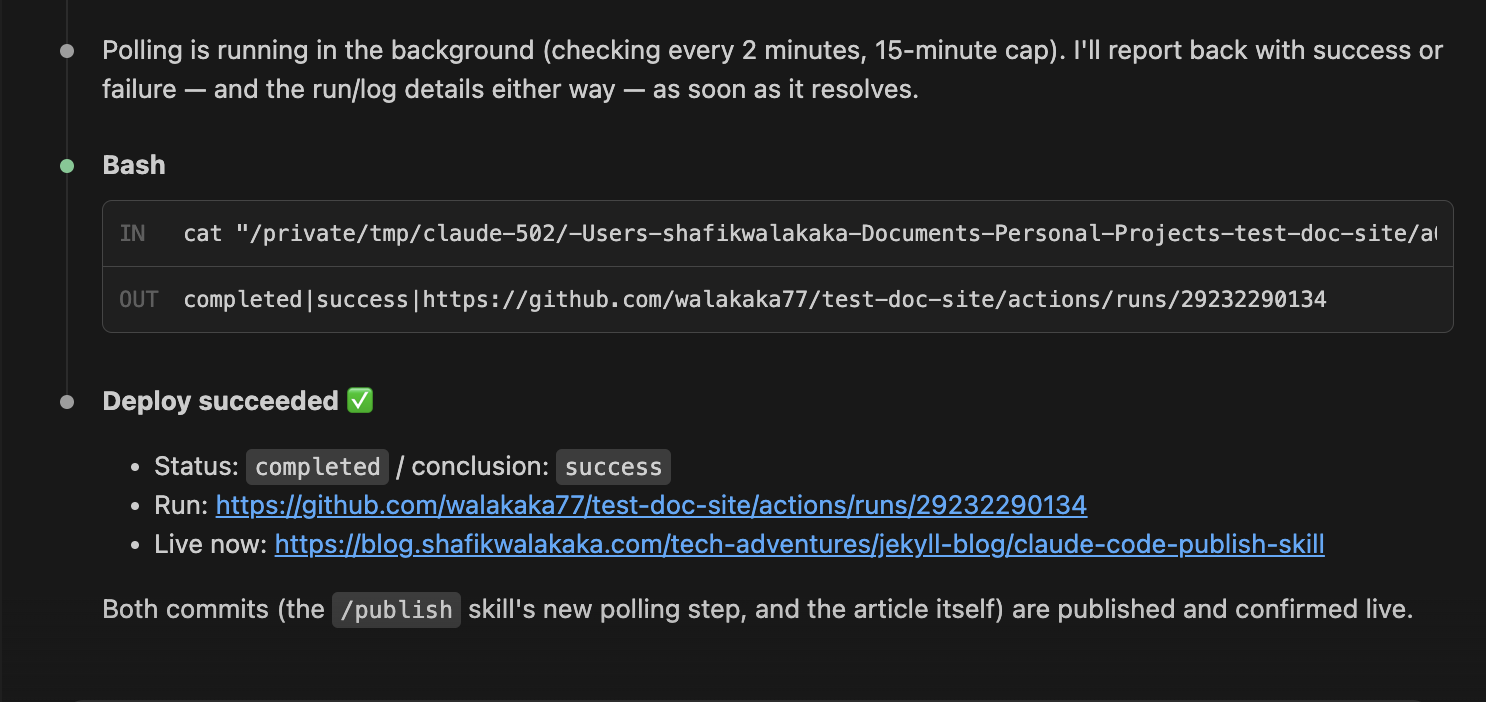
| Field | Value |
|---|---|
| Commit | 4fbe398a68b17f297a7db6cccacec7e8eb8017df |
| Status | completed |
| Conclusion | success |
| Run URL | github.com/walakaka77/test-doc-site/actions/runs/29232290134 |
That table is the raw status|conclusion|html_url line the polling loop emitted – not reconstructed from memory or estimated from elapsed time.
UI verification: confirming it’s actually live, not just “reported” live
The API says success. The last step is checking that a human, in an actual browser, sees the actual article – because an API returning success and a page rendering correctly are still two different claims:
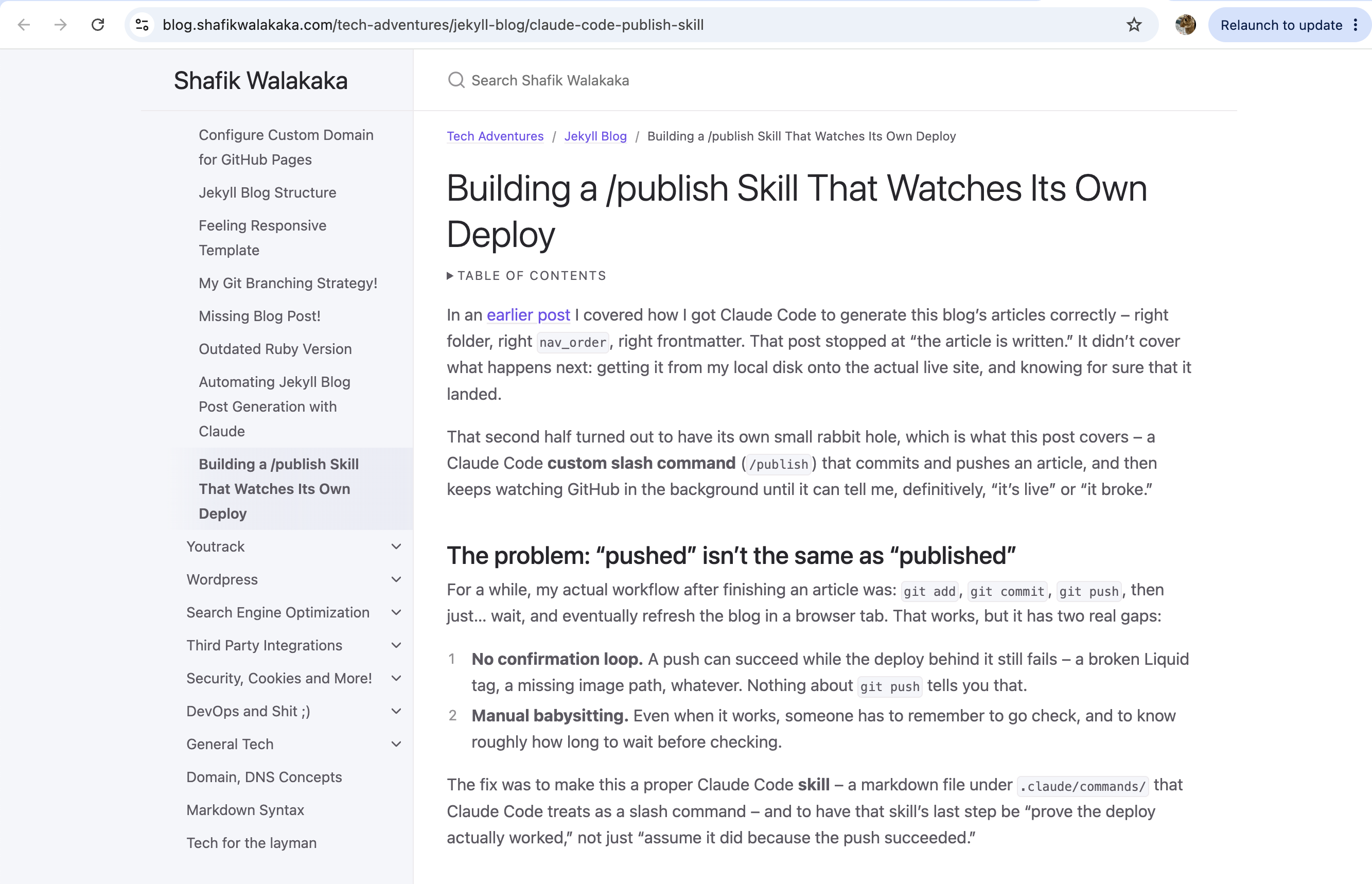
Title matches, breadcrumb (Tech Adventures / Jekyll Blog / Building a /publish Skill That Watches Its Own Deploy) matches, nav sidebar shows it slotted in at the right place, table of contents rendered. This is the step that closes the loop the whole skill exists for: not “did GitHub say it deployed,” but “can I actually see it.”
Why not simpler alternatives
| Approach | Why I didn’t use it |
|---|---|
| Just wait ~60s and assume success | Doesn’t catch actual build failures – a broken Liquid tag or bad image path would deploy silently as “probably fine” |
| Poll the legacy Pages-builds API | 404s for this repo – it isn’t how this specific site deploys |
Poll synchronously, blocking the whole /publish command | Ties up the conversation for up to 15 minutes for something that finishes in ~1-2 |
Poll “the latest run” without checking head_sha | Risks matching a different commit’s run if two pushes land close together |
Every one of these is a reasonable first instinct. The reason the final version differs from each is the same reason the earlier post’s workflow took four attempts to land: the simplest version of “check if it worked” only actually holds up once you’ve tried it against the real system and found where it breaks.
Files in this workflow
.claude/commands/publish.md The skill itself – the full step list, including the branch/staging/commit steps not covered in depth here, plus the polling and failure-reporting logic this post focuses on.
.claude/commands/branch.md A related skill, invoked as /branch, that creates a feature branch before starting a new article or set of articles – so drafts get reviewed in isolation before merging into main and running /publish.
CLAUDE.md (repo root) Governs how articles themselves get written – folder conventions, frontmatter, nav_order inference, formatting rules. /publish picks up after this is done; it doesn’t touch content.
Conclusion
The theme connecting this post and the earlier one on article generation is the same: don’t trust a step just because it’s supposed to have worked – check it against the real system, and if the obvious check turns out to hit a 404, figure out why instead of writing that off as noise. /publish isn’t just “commit and push” anymore. It’s “commit, push, and don’t stop until there’s a real answer.”
Until next time, peace and love!