Setting Up a Mock Adyen Terminal Locally
Table of contents
The previous post laid out two ways to integrate Adyen’s Terminal API: local (POS talks directly to a physical terminal) and cloud (POS talks to Adyen, which relays to the terminal). Testing either one for real requires actual hardware – a physical card terminal boarded to a merchant account. I don’t have one. This post covers what I used instead, and specifically why starting there was the right call rather than a workaround to apologize for.
Why a mock, and why first
Three real constraints line up here:
- No physical terminal. Ordering one takes “at least four business days” per Adyen’s own docs, and boarding an Android phone via their Payments Test app requires actual NFC hardware and a 3-step boarding flow.
- The cloud path needs a
deviceIdthat doesn’t exist without hardware. There’s no API call that creates one out of thin air – covered in full in the closing post of this series. - The message shape is identical regardless of transport. The
SaleToPOIRequest/SaleToPOIResponseJSON body doesn’t change between local and cloud – only how it physically gets to a terminal does. So a tool that speaks that message format correctly teaches the actual integration contract, even without touching Adyen’s real infrastructure at all.
Adyen’s own docs point directly at this as the no-hardware testing option: Test your integration.
What it is
adyen-examples/adyen-mock-terminal-api – a small community Node.js app, maintained by Adyen’s own DevRel team, that plays the role of a physical payment terminal. It exposes a POST /sync endpoint (same shape as a real terminal’s endpoint) and returns pre-written SaleToPOIResponse bodies based on what category of request it receives.
Straight from its own README:
“This mock application is currently in its alpha-release and is not supporting every terminal-api request and response. This application cannot reject all invalid requests. Always test your request and responses on your own physical terminal device first.”
Worth taking that caveat seriously – it’s a message-shape learning tool, not a certification/validation tool. Licensed MIT.
Tech stack
| Layer | What’s used |
|---|---|
| Runtime | Node.js (README requires 18+; ran here on v25.9.0 with no issues) |
| Web framework | Express |
| Server-rendered UI | express-handlebars (.hbs templates – no client-side framework, no build step) |
| Front-end libs | Bootstrap 4.1.3 and highlight.js, vendored directly (no npm/bundler involvement) |
| Tests (repo’s own) | Playwright – end-to-end tests against the running app |
| Container | Official Dockerfile, node:18-alpine base, also published to ghcr.io/adyen-examples/adyen-mock-terminal-api |
No TypeScript, no database, no build pipeline – plain JS readable top to bottom.
Prerequisites
- Node.js 18+ and npm (or Docker, as an alternative to installing Node locally)
- git, to clone the repo
- A browser, since the app’s own UI (the virtual PIN pad) is how a pending Payment request gets completed
- Nothing else – no Adyen credentials, no API key, no account of any kind. It never talks to Adyen.
How to run it
git clone https://github.com/adyen-examples/adyen-mock-terminal-api.git
cd adyen-mock-terminal-api
npm install
npm start
Visit http://localhost:3000/ – that’s the virtual terminal UI. Terminal API requests go to POST /sync on the same host/port.
Docker alternative (no local Node install needed):
docker run --rm -d --name adyen-mock-terminal-api -p 3000:3000 -e PORT=3000 ghcr.io/adyen-examples/adyen-mock-terminal-api:main
What running it actually looks like
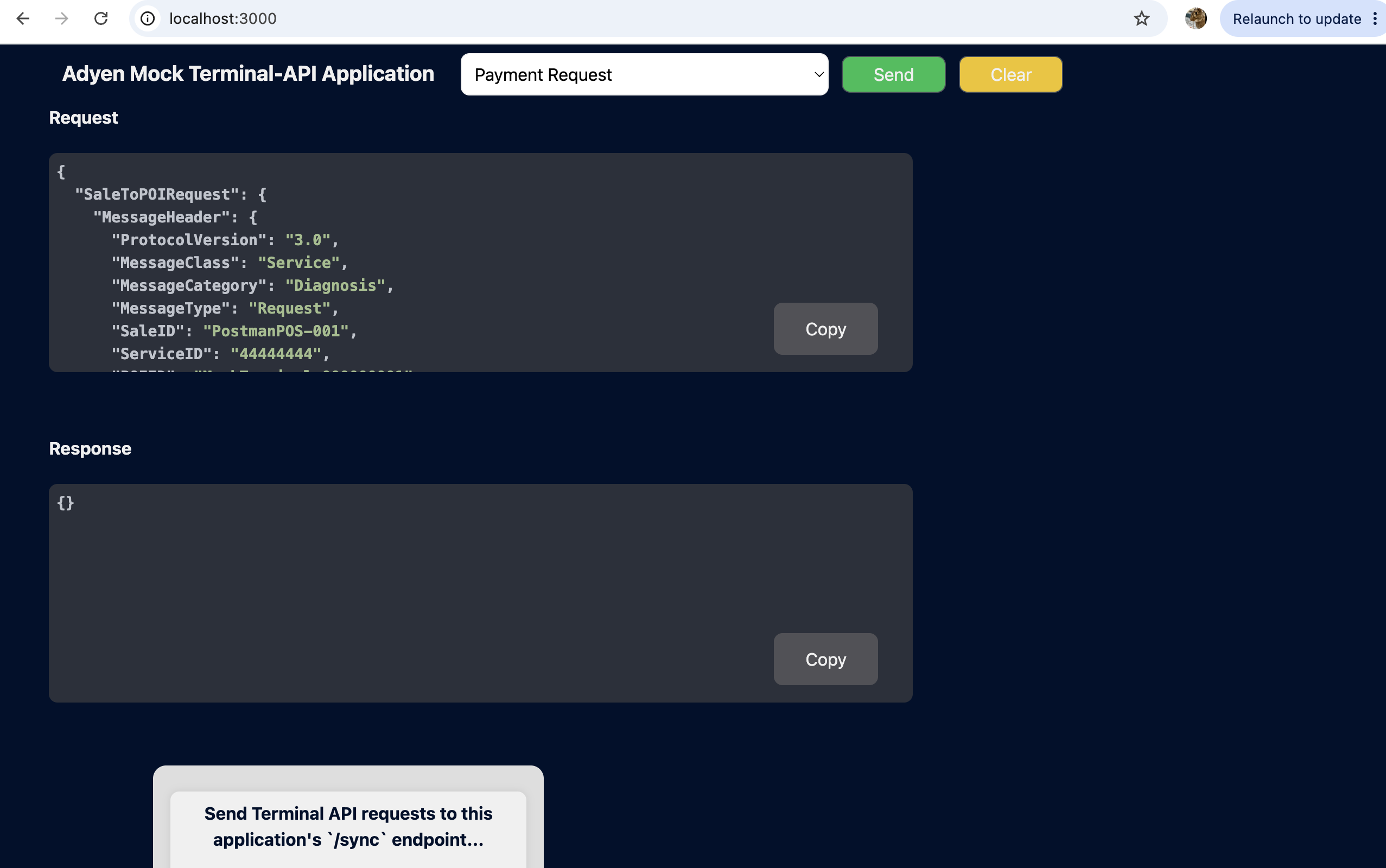
The default request selected is a Payment Request, with empty Request/Response panels until something is sent:
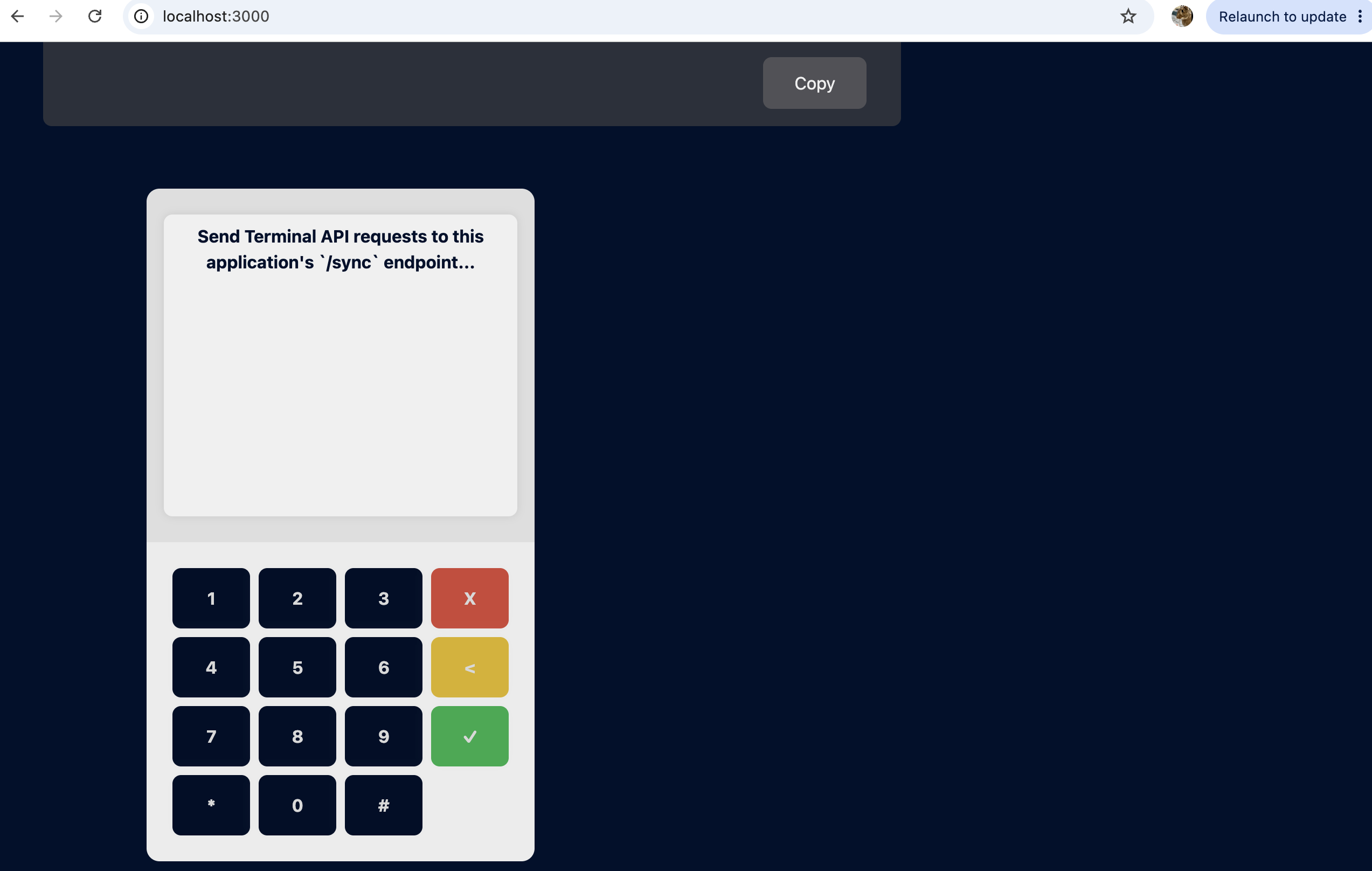
Scrolling down reveals the virtual PIN pad – this is what stands in for a shopper tapping/inserting a card and entering a PIN:
And here’s an actual Payment request/response pair populated in the panels, after sending a request and completing the PIN flow – request on top (MessageCategory: Payment, SaleID: PostmanPOS-001, a fresh ServiceID, POIID: MockTerminal-000000001), response below it (ServiceID: 1234567890AB, SaleID: SALE_ID_42, POIID: V400m-123456789):
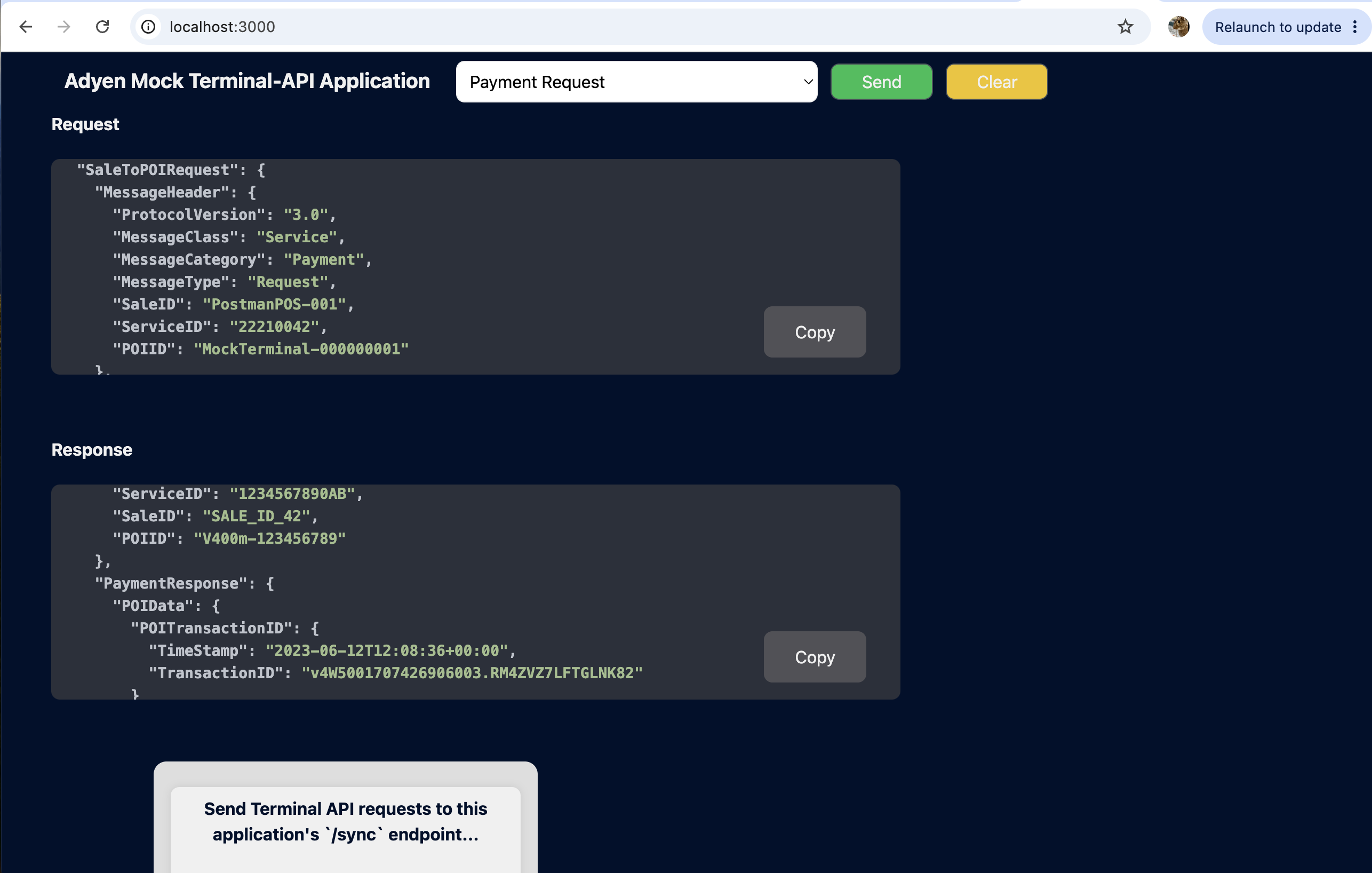
That mismatch between the request’s IDs and the response’s IDs is worth noticing now – it’s the first hint of something covered in depth in the next post: this tool’s responses are static fixtures, not computed from the request.
How it works internally
Fixtures load once, at startup
src/services/payloadsService.js walks public/payloads/ once, when the module is first required, and parses every *Request.json/*Response.json pair into an in-memory map keyed by a prefix ("payment", "124_paymentNotEnoughBalance", "reversal", "abortPayment", "paymentTransactionStatus", etc). Every response the app ever sends for a given category is the same in-memory object, every time – nothing is generated dynamically per request.
The whole app is ~35 lines
const express = require('express');
const handlebars = require('express-handlebars');
const defaultRoutes = require('./src/routes/defaultRoutes');
const userInteractionRoutes = require('./src/routes/userInteractionRoutes');

const port = process.env.PORT || 3000;
const app = express();
app.use(express.json());
app.use(express.static(path.join(__dirname, "public")));
app.engine("hbs", handlebars({ extname: "hbs", defaultLayout: "layout", ... }));
app.set("view engine", "hbs");

app.use("/", defaultRoutes);
app.use("/user-interaction", userInteractionRoutes);

app.listen(port, () => console.log(`Server started -> http://localhost:${port}`));
Two route groups, mounted at / and /user-interaction. That’s the entire architecture.
POST /sync dispatches purely on which key exists in the request body
router.post("/sync", async (req, res) => {
    if (req.body.SaleToPOIRequest.AbortRequest) { sendOKResponse(res, "abortPayment"); return; }
    if (userInteractionService.getState() === STATES.BUSY) { sendOKResponse(res, "paymentBusy"); return; }
    if (paymentService.containsPrefix(req)) {
        const paymentResponse = await paymentService.getResponse(req);   // <- blocks here for Payment
        sendOKResponse(res, paymentResponse);
        return;
    }
    if (req.body.SaleToPOIRequest.ReversalRequest) { sendOKResponse(res, "reversal"); return; }
    if (req.body.SaleToPOIRequest.TransactionStatusRequest) { sendOKResponse(res, "paymentTransactionStatus"); return; }
    // Anything else (e.g. DiagnosisRequest) falls through to:
    res.status(404).send({});
});
No schema validation, no check for a prior transaction, no authentication of any kind. This is also exactly why Diagnosis requests 404 – there’s simply no branch for that category.
The blocking-PIN mechanic
Only PaymentRequest actually blocks:
async getResponse(request) {
    userInteractionService.setState(STATES.BUSY);
    const isPinEntered = await this.getPinResultAsync();   // polls every 1s, up to 180s
    userInteractionService.setState(STATES.READY);

    if (isPinEntered) {
        const amount = request.body.SaleToPOIRequest.PaymentRequest.PaymentTransaction.AmountsReq.RequestedAmount;
        const lastThreeDigits = amount.toString().replace('.', '').padStart(3, '0').slice(-3);
        return paymentFailureMap[lastThreeDigits] || "payment";   // "payment" = the approved fixture
    }
    return {};
}
getPinResultAsync() resolves true only once the browser’s green ✓ has been clicked and exactly 4 PIN digits were entered. This state lives in a single in-memory singleton – there’s no concept of multiple concurrent terminals or sessions; it’s one shared state for the whole running process.
Step-by-step for every Payment request:
- Open
http://localhost:3000in a browser and leave it open. - Send the Payment request from Postman (it will spin / stay “pending” – expected).
- On the on-screen keypad, click any 4 digits.
- Click the green ✓ button.
- The Postman request completes with the response – approved or declined depending on the amount.
Abort, Reversal, and Transaction Status requests skip this entirely – the mock answers those immediately, no PIN interaction.
Decline simulation
The only field the app ever reads out of the request body is RequestedAmount – its last 3 digits (minor units) select a decline scenario via a lookup map:
| Suffix | Result | Message |
|---|---|---|
124 | Insufficient balance | NOT_ENOUGH_BALANCE |
125 | Card blocked | BLOCK_CARD |
126 | Card expired | CARD_EXPIRED |
127 | Declined online | INVALID_AMOUNT |
128 | Invalid card | INVALID_CARD |
134 | Wrong PIN | INVALID_PIN |
| anything else | Approved | – |
Anything not matching one of those returns the generic "payment" (approved) fixture. This is the same amount-suffix convention Adyen’s own physical test cards use for the same reason – so decline paths can be exercised deliberately without needing a card that would genuinely decline.
Validating the loop before touching Postman
Before handing this off to manual Postman testing, the full request/response loop was validated directly via curl:
POST /syncwith aPaymentRequest(€10.00) → confirmedGET /user-interaction/get-statereported"BUSY".- Simulated PIN entry: four
POST /user-interaction/enter-pincalls, thenPOST /user-interaction/confirm-button. - The original
curlcall returned, withResponse.Result: "Success". - Repeated with
RequestedAmount: 1.24→ confirmedNOT_ENOUGH_BALANCErefusal came back correctly. - Sent
Abort,Reversal,TransactionStatusrequests – all returned immediately, each withResult: Successregardless of any prior transaction. - Sent a
Diagnosisrequest – confirmed404with an empty body, matching the “not supported” expectation from reading the source.
Validating via curl first, before Postman or the browser, is what gave confidence to hand this off for manual testing – if something had been wrong with the basic request/response loop, it would have shown up here first, without the PIN-entry UI as a confounding variable.
Known limitations
- Alpha-release, by its own admission – doesn’t validate all invalid requests; a 200 from this tool isn’t proof a real terminal would accept the same payload.
- All responses are static fixtures – no field in a response is ever computed from the request.
- No state/correlation validation – Abort, Reversal, and TransactionStatus will “succeed” against a ServiceID/TransactionID that never existed. A real terminal would reject that.
- Diagnosis isn’t implemented – always 404s, regardless of payload.
- Single global state, one PIN flow at a time – no multi-terminal or concurrent-transaction simulation.
Every one of these limitations turns into a specific finding in the rest of this series – starting with the next post, where sending the exact same approved-payment request twice makes the static-fixture behavior directly visible.
What’s next
With the mock running and its internals understood, the next post walks through an actual approved payment end to end – request, PIN entry, response – and proves the static-fixture claim above with the mock’s own source code and a side-by-side field comparison.
References
- Repo: github.com/adyen-examples/adyen-mock-terminal-api
- Adyen’s own docs pointing to this tool as the no-hardware testing option: Test your integration
Until next time, peace and love!