A Task Board for a Two-Person Website – Seeing Every Change Before It Goes Live
Table of contents
A companion to the series on running petcoach.sg like a software team. That series covers the machinery: one repo, a local copy of the site, a test site, live, and Claude Code skills that drive it all. This post is about what happened a few days later, once Qiai and I were both actually using it: the number of moving parts quietly went up, and I needed one place to see all of them.
The answer was a small web page I call the task board. It runs on my Mac, it only reads, and it shows every change planned for the live site, where each one is, and whose it is.
Qiai never has to learn git for any of this. She talks in tasks, Claude keeps the branches out of sight, and the board shows the same tasks to both of us.
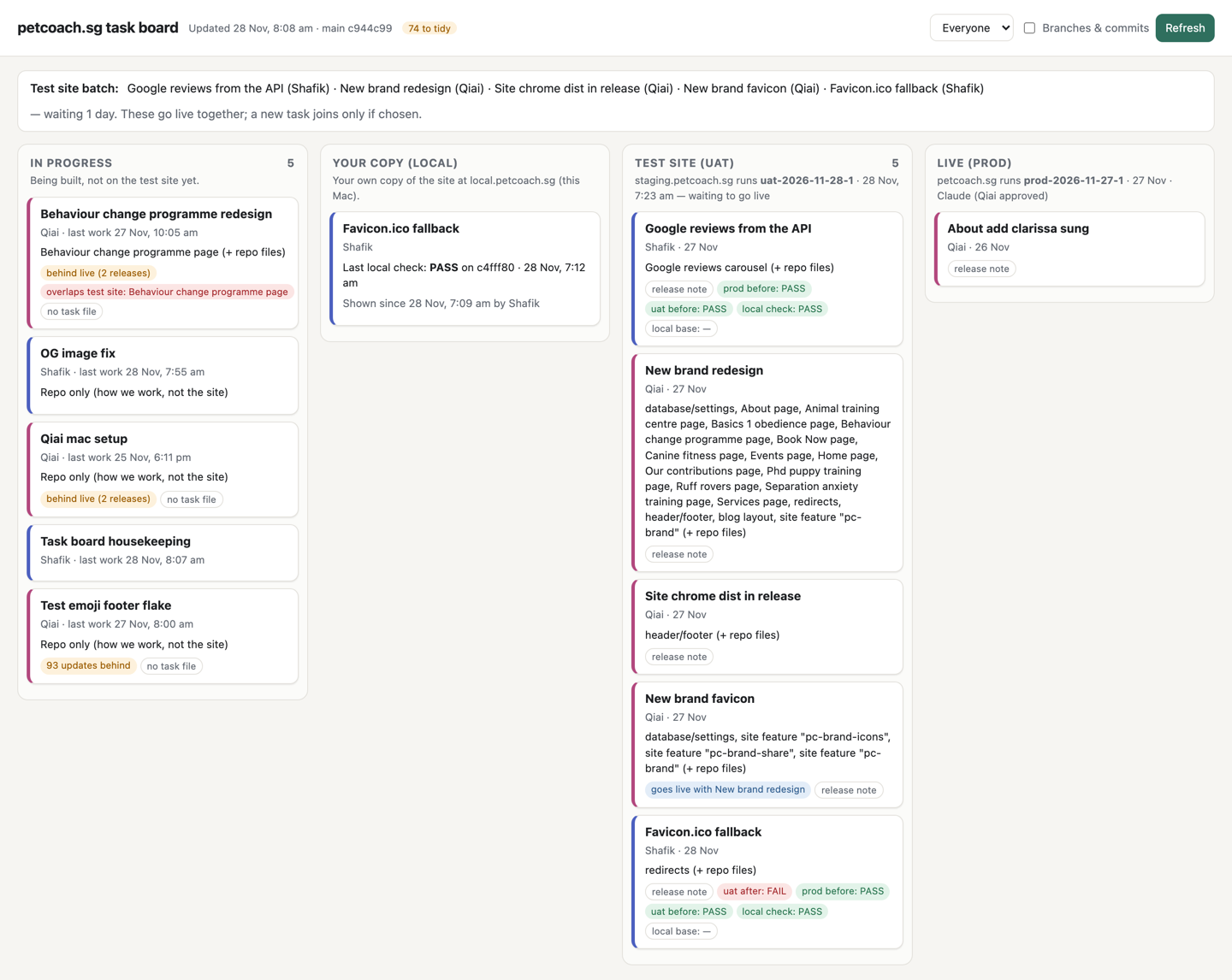 The task board on 28 November 2026, business view. Five tasks were waiting together on the test site.
The hidden complexity of two people and many branches
With one person and one change at a time, git barely registers. You make a branch, test it, merge it, done. Add a second person, each with their own Mac and their own Claude, and a few things start piling up that nobody planned for:
- Two changes to the same page. Qiai had a Behaviour change programme redesign in progress while the New brand redesign sitting on the test site also restyled that same page. Neither of us did anything wrong, but whoever goes second has to build on the first, not over it.
- Branches falling behind live. A task started on Tuesday doesn’t contain what went live on Wednesday. On 28 November one in-progress task was 93 updates behind the latest code. Review it as it is and you’re reviewing a site that no longer exists.
- A test site holding several people’s work. Our rule is that the test site holds one batch, and the batch ships whole (more on that below). On 28 November that batch was five tasks from both of us: Google reviews from the API (mine), New brand redesign, Site chrome dist in release and New brand favicon (Qiai’s, the last two being fixes to her redesign), and Favicon.ico fallback (mine).
- Leftovers. Merged branches nobody deleted, a fix branch that never got pushed because a better fix replaced it, extra working folders Claude creates when it runs helpers in parallel (git “worktrees”), and an old design repo still attached as a second “remote” with unfinished work in it.
None of these is a disaster. Together they mean that “what is about to go live, and is it safe?” stops being something you can answer from memory.
What the board shows
The board is a local page (npm run board, then http://localhost:4545). It’s built from data the skills already produce: git, one small JSON file per task, and a release marker file that every deploy writes on each site. No passwords are involved, and it only listens on the Mac it runs on.
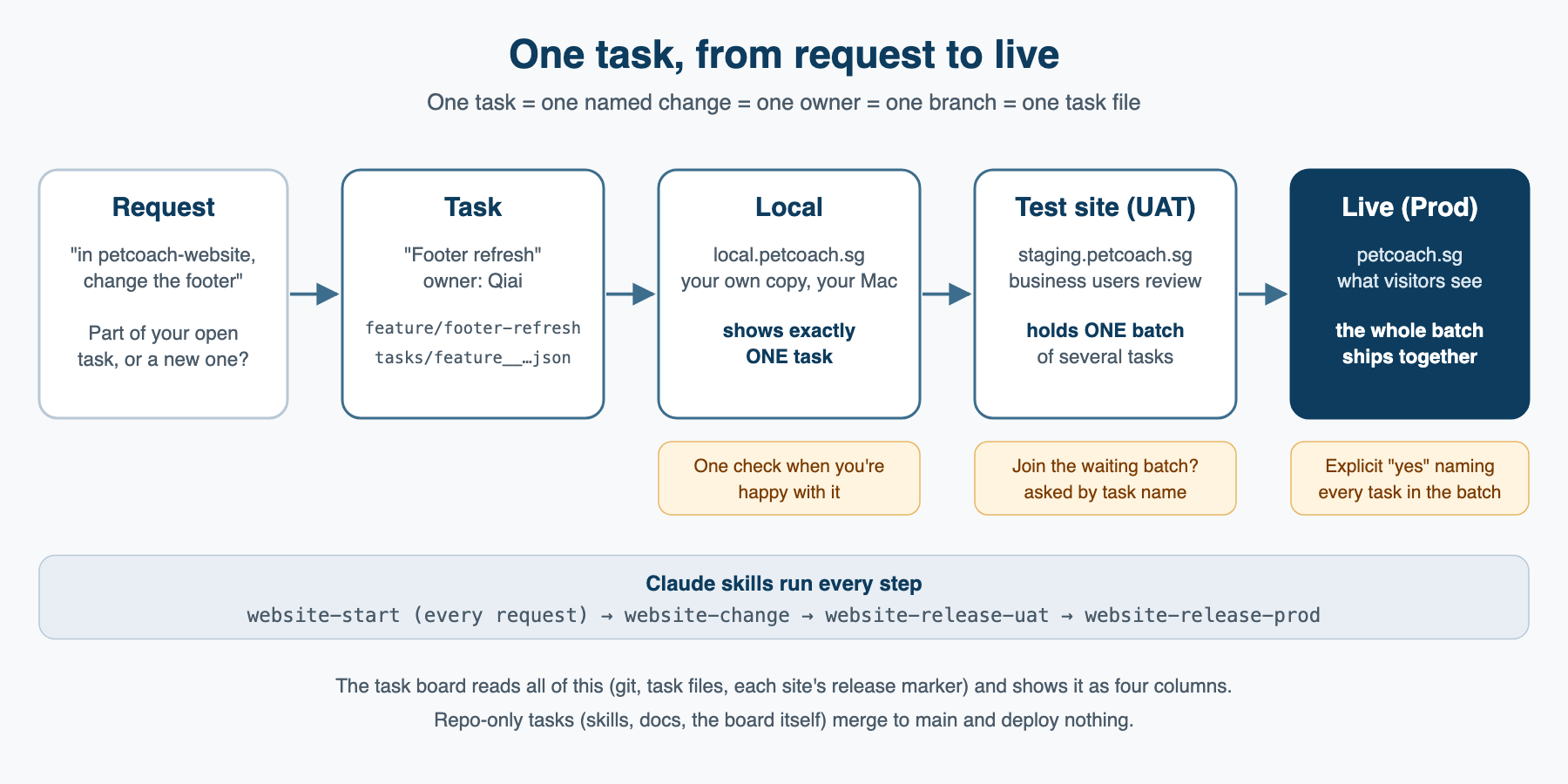 The path every task takes. The board’s columns follow it left to right.
The four columns:
| Column | What it means |
|---|---|
| In progress | Being built, not on the test site yet. Each card says whose it is, what it changes (“Behaviour change programme page”), and flags like behind live (2 releases) or overlaps test site. |
| Your copy (Local) | Which single task your own copy of the site at local.petcoach.sg is showing right now, and whether its one local check passed on the latest version. |
| Test site (UAT) | The batch waiting on staging.petcoach.sg, with each task’s release note and test results. The banner on top names every task in it and how long it’s been waiting. |
| Live (Prod) | What petcoach.sg is running, and which tasks went live in that release. |
A card marked Repo only (how we work, not the site) is a change to skills, docs or tooling. Those never touch the site at all (see the last section).
Same board, two audiences
There’s a Branches & commits toggle. Off, the board is all task names and plain words, which is what Qiai sees. On, every card also shows its branch, release tag and commit, which is what I want when I’m reviewing.
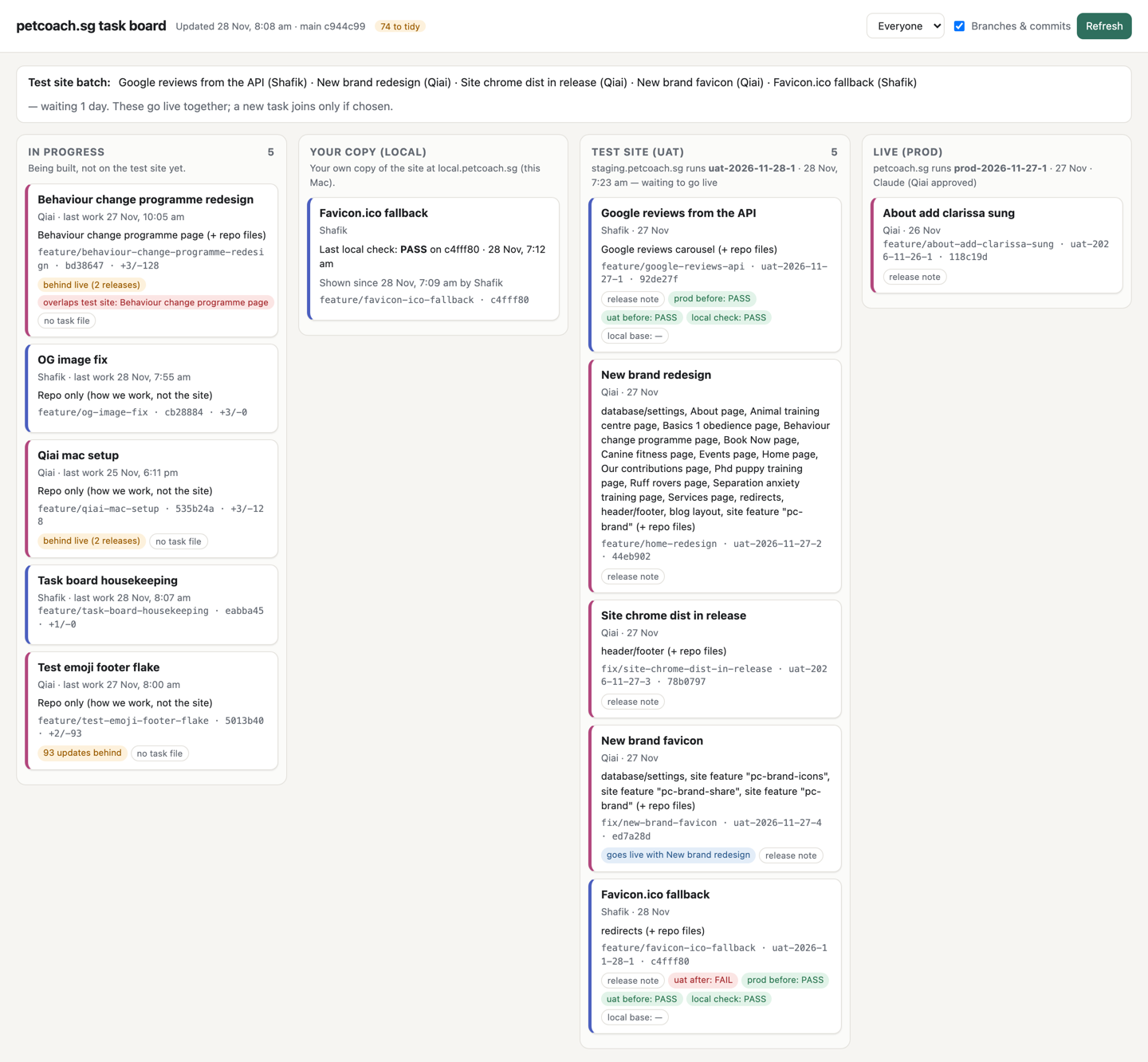 Tech view: the same cards, plus branch, tag and commit for the maintainer.
It also works at phone width, which is handy for a quick “what’s waiting?” away from the desk.
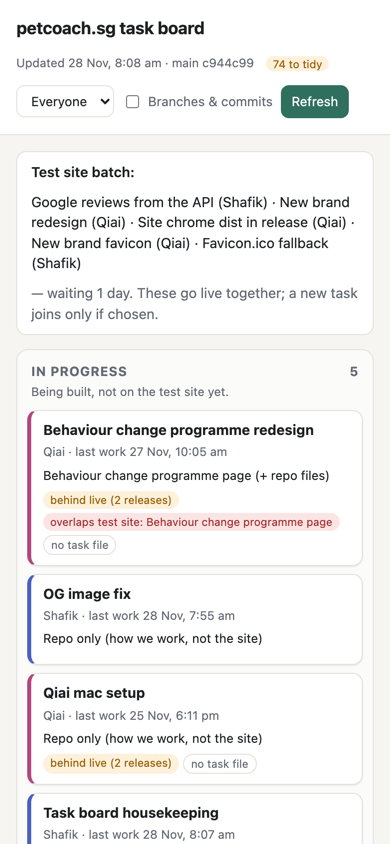 Phone width: columns stack, nothing scrolls sideways.
Everything about a task in one panel
Clicking a card opens its detail panel: what it changes, the test expectations (the written list of what this release is supposed to change, which the before/after tests compare against, explained in the release tests post), the release note and this Mac’s test runs.
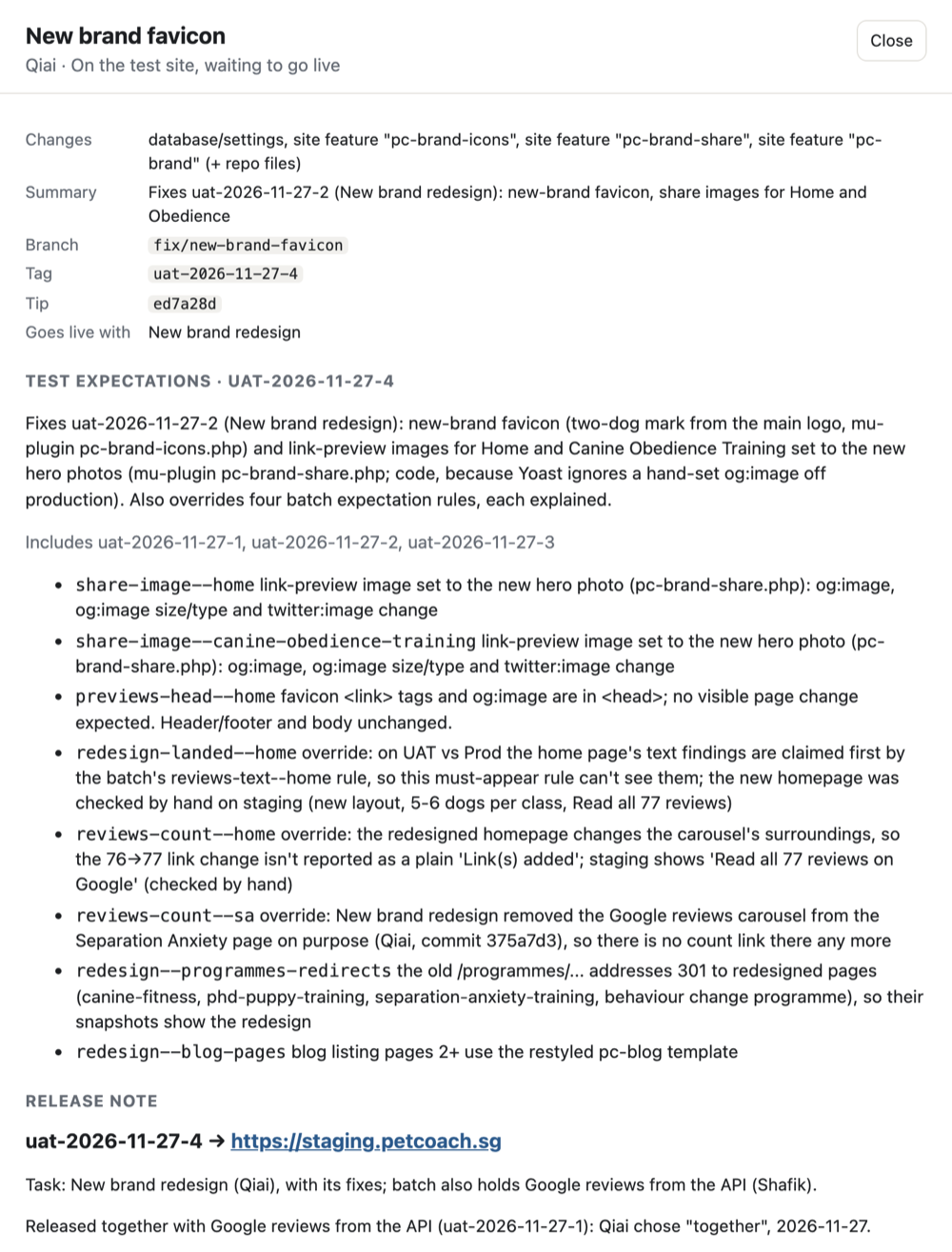 New brand favicon: it fixes the redesign, says it must go live with it, and lists each expected change with its reason.
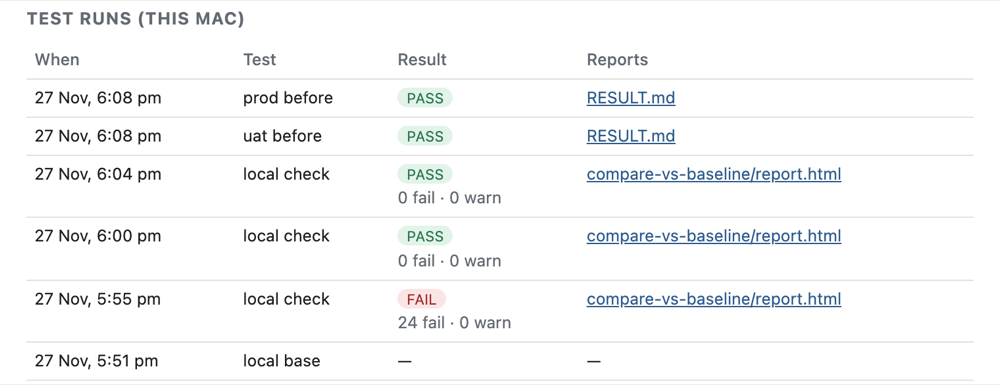 Test runs for Google reviews from the API: a failed local check, fixed, then passing before runs on the test site and live. Each report opens from the page.
This is the part that makes reviewing easier for me. Before, checking a release meant opening the release note, the expectations file and a test report folder separately. Now it’s one click per task. And the board doesn’t hide bad news: Favicon.ico fallback shows a red uat after: FAIL, and its release note right there explains why (two rules matched in the wrong order, verified by hand, not a site problem).
The live release history
Below the columns is every live release, newest first. Each one expands to the release note it was promoted from: what changed, the tests, who approved it in chat.
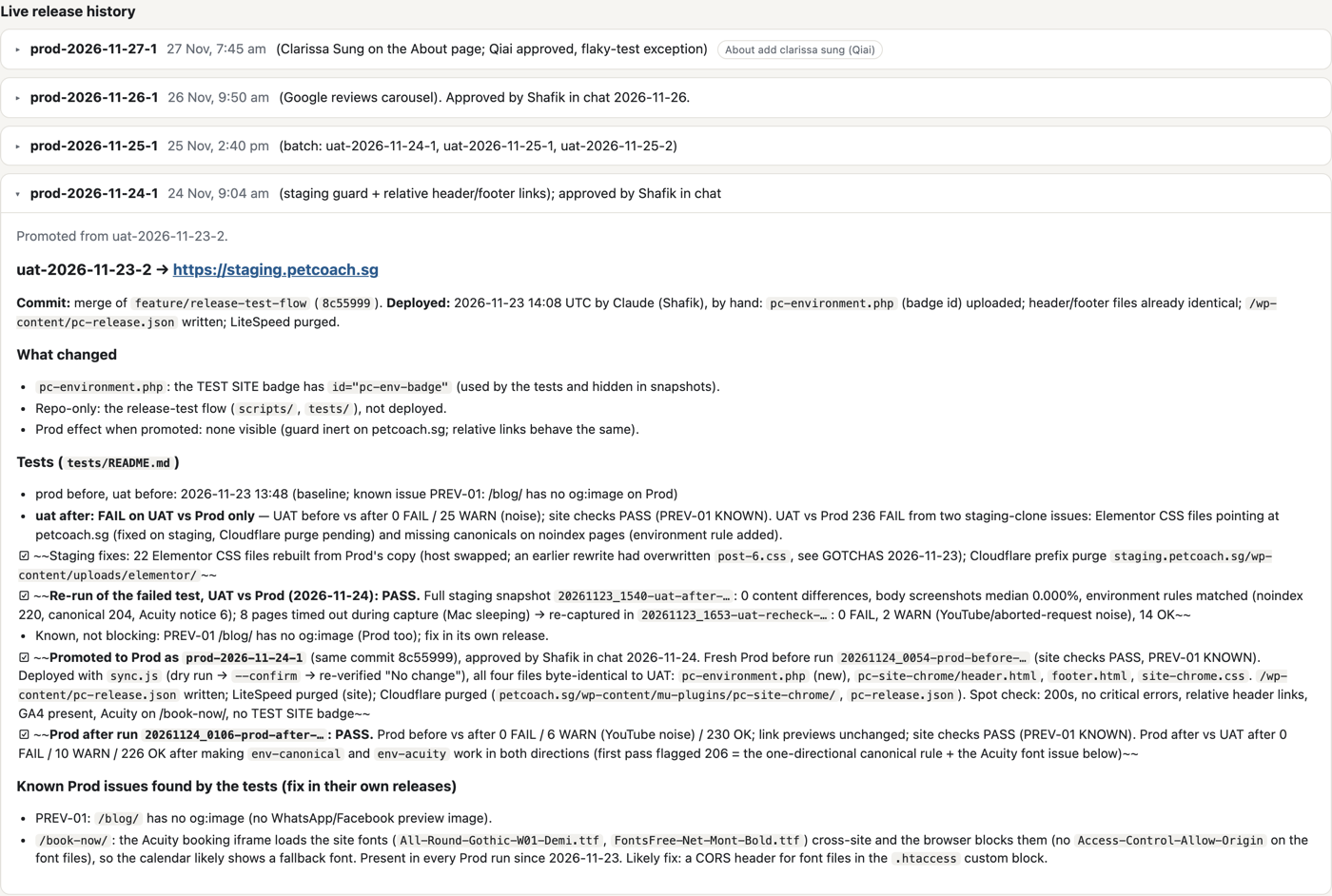 The first live release of the new flow, expanded: the staging guard and relative header/footer links.
Housekeeping: what’s no longer part of any task
The newest addition is the N to tidy chip at the top, which jumps to a Housekeeping section. It lists everything that isn’t a task any more, each with a suggested action:
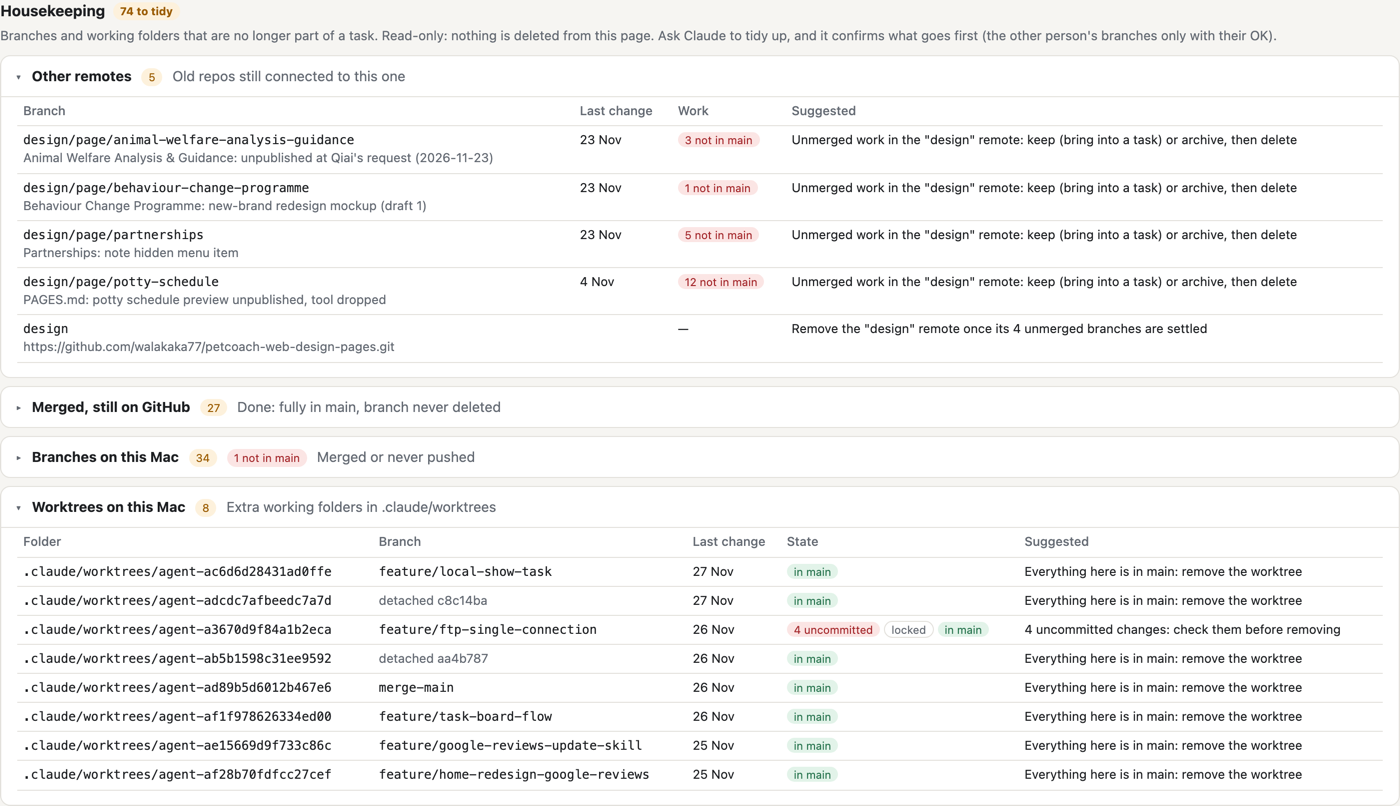 Housekeeping on 28 November: 74 items, none of them urgent, all of them noise.
The first run was a bit humbling:
- 27 merged branches still on GitHub, fully in
main, never deleted. - One fix branch only on this Mac, never pushed: a stop-gap for FTP retries that a better fix (one connection per deploy) made obsolete.
- 8 leftover Claude worktrees, one of them with 4 uncommitted changes to check before anything is removed.
- 4 unmerged branches on the old design repo, which is still attached as a second remote.
Nothing has been cleaned up yet. The section is read-only on purpose: tidying is something I ask Claude to do, it confirms the exact list in chat first, and Qiai’s branches only go with her OK. A branch whose task is still in the test-site batch is never listed, because release notes and rollbacks still point at it.
Why business users don’t need to learn git
The board only works because every change has a name. That’s enforced by the skills, not by discipline. Every website request goes through the same chain:
website-startruns first, every time. It syncs with GitHub, checks the test site and live, and prints the short version of the board.website-changesettles which task this is before building anything, creates the branch and a small task file ({"name":"…","owner":"Qiai",…}), and shows the task alone on Local.website-release-uatputs it on the test site, asking first if other tasks are already waiting there.website-release-prodputs the batch live after an explicit yes.
One task = one named change = one owner = one branch = one task file. Qiai never sees the branch. She sees something like “Footer refresh is ready to put on the test site”. (How the skills are written for that is in Claude Skills Shaped Around How Business Users Actually Ask.)
The upskilling that is actually needed
There’s still something to learn, but it’s much smaller than “learn git”:
- Start a new Claude session for site work, and name the project. “In petcoach-website, change the footer…” makes sure the website skills load and run. A fresh session also picks up any skill the other person changed since.
- Understand what a task is. A task is a named change with an owner, like “Home page redesign”. When you ask for something new while you already have a task open, Claude asks: “Is this part of Home page redesign, or a new task? A new task can be tested and go live on its own.” Same goal or same pages, say part of it. Unrelated, say new.
- Know the three places your change can be:
- Local (local.petcoach.sg) is your own copy of the site on your Mac. Fast to change, nobody else sees it, and it shows exactly one task at a time, so what you review is only that change.
- The test site (staging.petcoach.sg) is the full test. This is where the business side reviews. It holds one batch, possibly with several people’s tasks in it.
- Live (petcoach.sg) is what visitors see.
That’s it. With those three ideas, Qiai can read the board, answer Claude’s questions, and run a change from request to live.
Two rules the board makes visible
The batch goes live whole
Everything on the test site ships together. No partial promotions: what we reviewed on staging is exactly what goes live. If one task in the batch has to come out, it’s reverted with its own small change and the rest of the batch is re-tested on the test site before going live (CLAUDE.md Rule 9). And a new task only joins a waiting batch if its owner chooses to. Claude asks by name, for example: “Add Clarissa to About is already waiting on the test site. Release both together, or hold Home page redesign until it goes live?”
The batch banner exists because of this rule. It’s the list of everything that will go live the next time someone says “yes”.
Repo-only changes deploy nothing
Some tasks change how we work, not the site: skills, tests, docs, and the board itself. Those merge to main after my approval and deploy nothing (Rule 11). A deploy only ever uploads what the site runs: the wp-content code (theme, mu-plugins, fonts), the built header/footer, page content and redirects. So building the board never put the live site at risk, and it never had to wait in a batch.
Where it could go next
Right now the board is a neat little tool on my Mac: read-only, local-only, showing this Mac’s test runs. If the project grows (more people, more sites), the obvious next steps are hosting it behind a login so Qiai can open it without asking Claude, and adding the cleanup actions once I trust the housekeeping list. For two people, it doesn’t need more than that yet.
Conclusion
The release flow kept the live site safe from day one. What it didn’t do was make the state of everything easy to see once two people were using it: overlapping pages, branches behind live, five tasks sharing one test site, and a pile of leftovers. A read-only board, built from data the skills already write, fixed that for me as the reviewer, and because it speaks in task names, it works for Qiai too. The real win is still the same one as the rest of the series: the business user learns three ideas (session, task, three sites), and the skills carry everything else.
Until next time, peace and love!